

AppSettings row) and take effect immediately without a container restart — saving a change calls runtime.reload(), which tears down the existing Salt client and schedulers and rebuilds them from the new values.
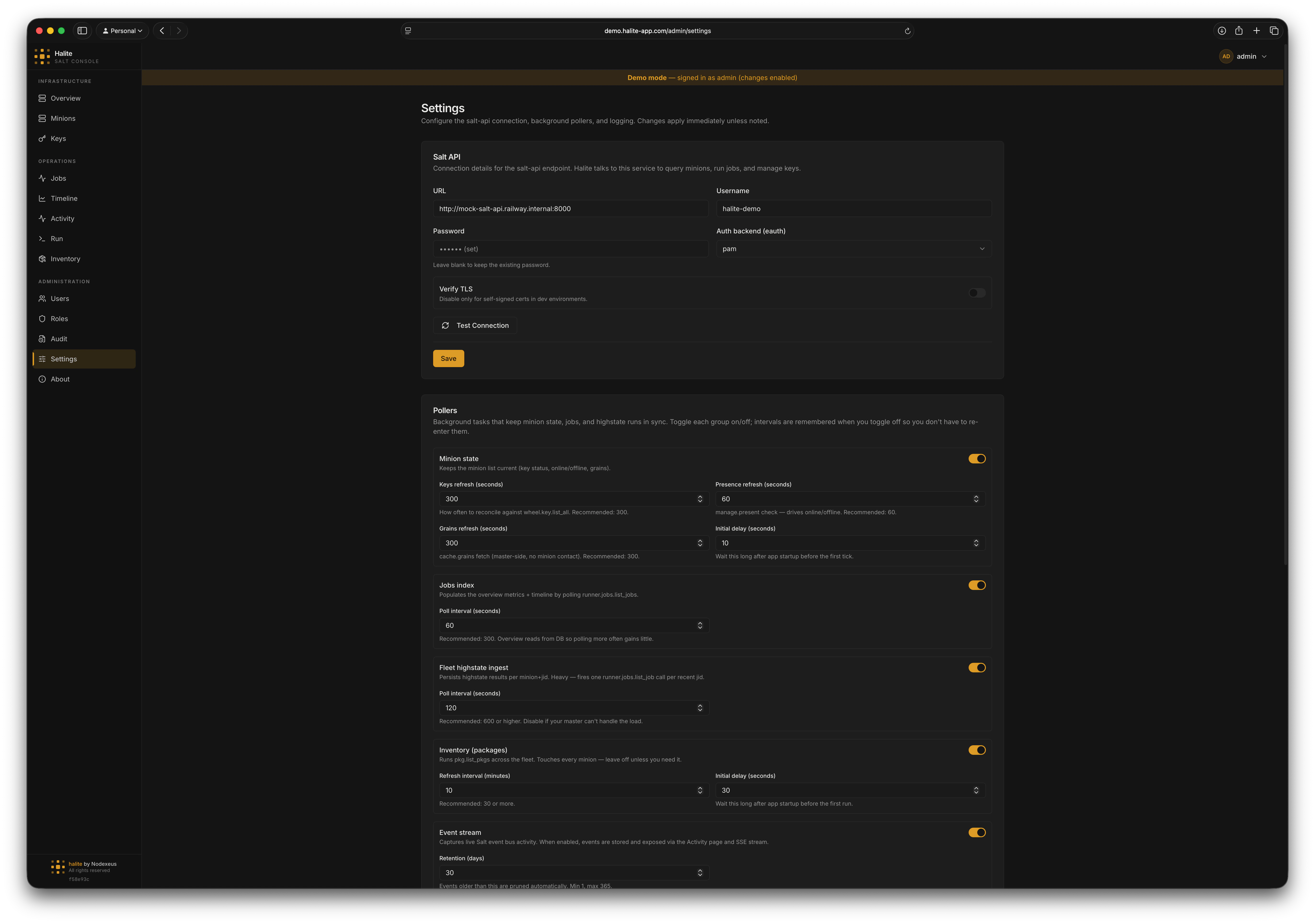
Settings form showing Salt API connection fields and poller intervals
Salt API connection
These fields configure how Halite authenticates tosalt-api.
URL
The full URL of your
salt-api instance, including scheme and port (e.g. https://salt.internal:8000). Clearing this field disables the Salt connection — all background schedulers stop and salt-backed endpoints return empty or degraded responses.string
The Salt service account username. Maximum 255 characters.
string (write-only)
The service account password. The password is encrypted at rest using the server’s
COOKIE_SECRET and is never returned by the API — only a boolean password_set flag is returned so the UI can show (set) without exposing the value.string
default:"pam"
The Salt external auth backend. Accepted values:
pam, sharedsecret, ldap, file, auto.boolean
default:"true"
Whether to verify the
salt-api TLS certificate. Set to false only if your salt-api uses a self-signed certificate and you accept the risk.Testing the connection
Before saving, click Test Connection to validate the credentials without persisting them (POST /api/admin/settings/test-salt). The response includes ok, a detail message, and a minion_count when manage.present succeeds. You can also test the currently-saved credentials with POST /api/admin/settings/test-salt-saved (the password is read from the database, not re-entered).
Poller intervals
These fields control how often background tasks run. Set any interval to0 to disable that scheduler.
integer
default:"0"
How often (in minutes) the inventory scheduler collects
pkg.list_pkgs from the entire fleet. 0 disables the scheduler. Range: 0–1440.integer
default:"30"
Seconds to wait after startup before the first inventory collection run. Range: 0–3600.
integer
default:"0"
How often (in seconds) the fleet scheduler looks for new
state.* JIDs and ingests highstate results. 0 disables. Range: 0–86400.integer
default:"0"
How often (in seconds) the jobs scheduler polls for new job index entries.
0 disables. Range: 0–86400.integer
default:"300"
How often (in seconds) the minion scheduler refreshes key state for all minions. Range: 0–86400.
integer
default:"60"
How often (in seconds) the minion scheduler refreshes online/offline presence via
manage.present. Range: 0–86400.integer
default:"300"
How often (in seconds) the minion scheduler refreshes grains for accepted online minions. Range: 0–86400.
integer
default:"10"
Seconds to wait after startup before the minion scheduler’s first tick. Range: 0–3600.
Event stream
The Event stream controls live at the bottom of the Pollers section. They drive the Activity feed, which tails the Salt event bus instead of polling. Saving the Pollers section callsruntime.reload(), so toggling the stream starts or stops the event consumer with no restart.
boolean
default:"false"
Master switch for the live event stream. When on, Halite holds a long-lived connection to salt-api’s
/events endpoint, captures job / key / minion events, stores them, and exposes them via the Activity page and SSE stream. When off, no events are captured and the Activity page is empty.integer
default:"30"
How many days of captured events to keep. The event consumer prunes rows older than this. Range: 1–365.
Activity widget
These fields configure the Recent activity widget on the Overview dashboard. They are display-only — saving this section does not trigger aruntime.reload(), and the values are readable by every authenticated user (via GET /api/activity/widget-config) so the widget renders the same way for everyone.
boolean
default:"true"
Hide job dispatch (
job.new) events from the widget, leaving only completions and outcomes.boolean
default:"false"
Hide routine successes — successful job returns that made no changes.
boolean
default:"true"
Include job events in the widget.
boolean
default:"true"
Include key events in the widget.
boolean
default:"true"
Include minion events in the widget.
integer
default:"6"
How many events to list in the widget. Range: 1–50.
integer
default:"60"
The time window (in minutes) the heartbeat indicator counts events over. Range: 5–1440.
Logging
string
default:"json"
The backend log format. Accepted values:
json (structured JSON lines, best for log aggregators) or text (human-readable). Note that current builds initialize logging with a hardcoded json format at startup, so this setting is not applied to the running process — a container restart would be required once it is wired up.How live reload works
When you save the Salt or Pollers sections, Halite callsruntime.reload(db) to rewire the live Salt client, schedulers, and event consumer with no restart. Saving the Activity widget or Logging sections does not trigger a reload — those are display-only.
- All running schedulers (minion, fleet, inventory, jobs) and the event consumer are cancelled and awaited.
- The Salt client is closed.
- The
AppSettingsrow is re-read from the database. - If
salt_api_url,salt_api_username, and the decrypted password are all present, a newSaltAPIClientis created and logged in. - Any schedulers whose interval is
> 0are started fresh with the new settings, and — ifevent_stream_enabledis on — the event consumer is started.
None and all schedulers stay stopped. Salt-backed endpoints (minion presence, job dispatch, inventory refresh, etc.) degrade gracefully — they return empty results rather than hard-failing.
Walkthrough: connecting to a Salt master
1
Open Settings
Click Settings in the left sidebar. You need the admin role.
2
Enter the Salt API URL
In the Salt API section, enter the full URL of your
salt-api instance, e.g. https://salt.example.com:8000.3
Enter credentials
Enter the service account
username and password. Set eauth to the backend your Salt master uses (typically pam). If your salt-api uses a self-signed certificate, toggle Verify TLS off.4
Test the connection
Click Test Connection. If the status shows
ok: true with a minion count, the credentials are valid.5
Save
Click Save Salt Settings. Halite immediately re-wires the live Salt client — you do not need to restart.
6
Enable pollers (optional)
In the Pollers section, set non-zero values for the schedulers you want. For example, set
minion_state_presence_interval_seconds = 60 to get live online/offline status every minute. Click Save Poller Settings.