> ## Documentation Index
> Fetch the complete documentation index at: https://www.halite-app.com/llms.txt
> Use this file to discover all available pages before exploring further.
# Users & Roles
> Manage users, roles, and permissions.
The Users & Roles section of Halite lets you create and manage console accounts, assign roles, build custom roles with fine-grained `verb:resource` permissions, reset passwords, and deactivate users — all from the admin UI. For a conceptual overview of how permissions are evaluated, see [RBAC](/concepts/rbac).
All user and role management operations require the `manage_user:user:*` or `manage_role:role:*` permission. These are granted only to the built-in **admin** role. Do not share admin credentials with operators who should have limited access.
## Users
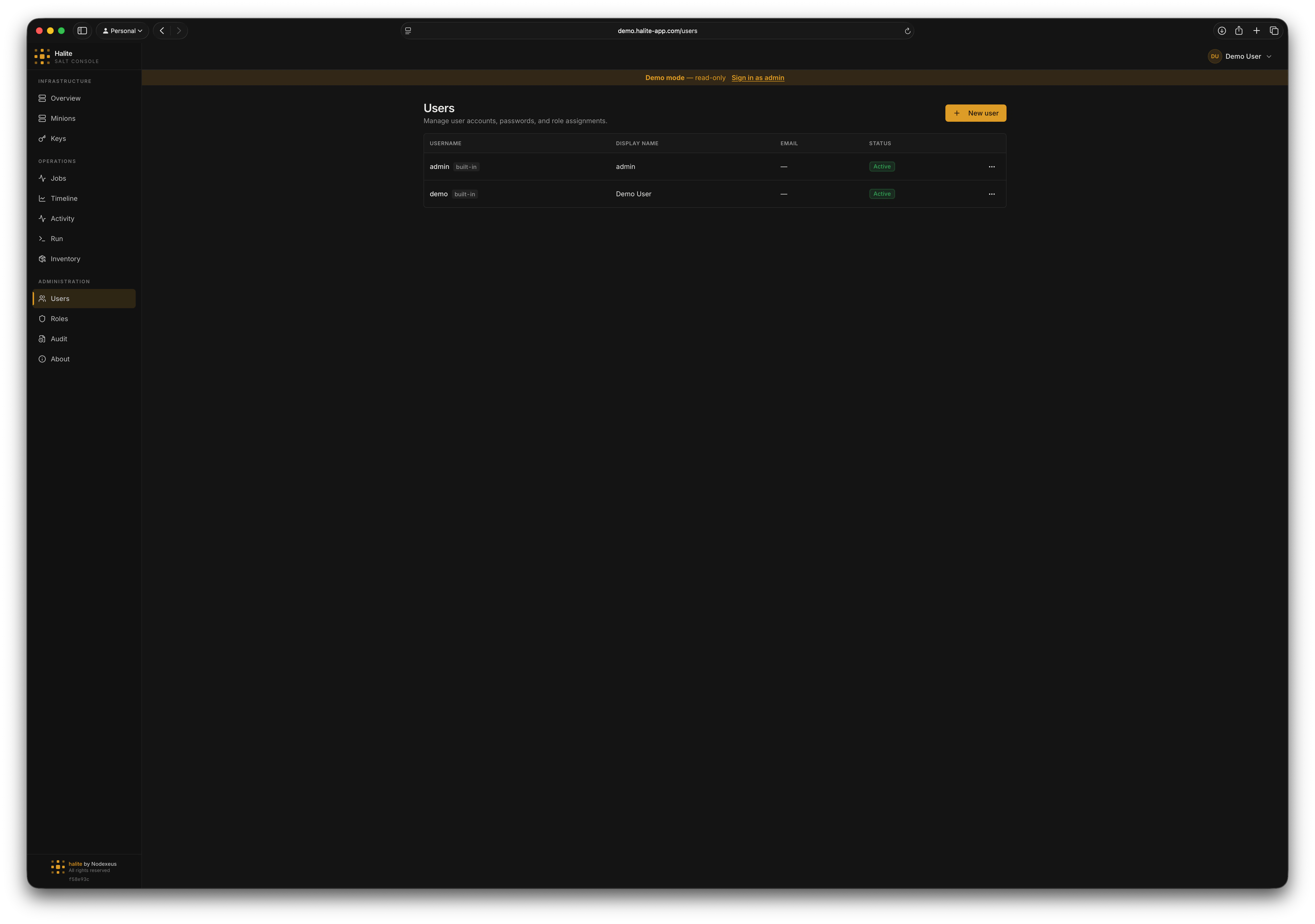 ### User fields
Each user account has the following attributes:
| Field | Description |
| ---------------- | -------------------------------------------------------------------- |
| `username` | Unique login name (1–255 characters) |
| `display_name` | Human-readable name shown in the UI (optional) |
| `email` | Optional email address |
| `is_active` | If `false`, the user cannot log in |
| `is_builtin` | Built-in users (e.g. the initial `admin`) cannot be deleted |
| `must_change_pw` | If `true`, the user is forced to change their password on next login |
| `created_at` | Account creation timestamp |
| `last_login_at` | Most recent successful login |
### Creating a user
Click **Settings → Users** in the admin sidebar.
Fill in the username (required), display name, email, and initial password (minimum 8 characters). Leave **Must change password** checked so the user sets their own password on first login.
Select one or more roles from the role picker. You can also assign roles later from the user detail panel.
Click **Create**. The new user appears in the list immediately. The action is recorded in the [audit log](/concepts/audit-log).
### Updating a user
You can change a user's `display_name`, `email`, or `is_active` status via `PATCH /api/users/{user_id}`. You cannot change a user's username after creation.
To **deactivate** a user, set `is_active` to `false`. Deactivated users cannot log in and any existing sessions are preserved until they expire naturally. To terminate active sessions immediately, trigger a password reset (which calls `end_sessions_for_user` on the backend).
### Resetting a password
`POST /api/users/{user_id}/password` with a `new_password` (minimum 8 characters) and `must_change_pw` flag. Setting a new password terminates all existing sessions for the target user.
### Deleting a user
Built-in users cannot be deleted — the API returns `409 Conflict`. You also cannot delete your own account. Deletions are permanent; the audit log retains a record of all actions the deleted user performed.
## Roles
### User fields
Each user account has the following attributes:
| Field | Description |
| ---------------- | -------------------------------------------------------------------- |
| `username` | Unique login name (1–255 characters) |
| `display_name` | Human-readable name shown in the UI (optional) |
| `email` | Optional email address |
| `is_active` | If `false`, the user cannot log in |
| `is_builtin` | Built-in users (e.g. the initial `admin`) cannot be deleted |
| `must_change_pw` | If `true`, the user is forced to change their password on next login |
| `created_at` | Account creation timestamp |
| `last_login_at` | Most recent successful login |
### Creating a user
Click **Settings → Users** in the admin sidebar.
Fill in the username (required), display name, email, and initial password (minimum 8 characters). Leave **Must change password** checked so the user sets their own password on first login.
Select one or more roles from the role picker. You can also assign roles later from the user detail panel.
Click **Create**. The new user appears in the list immediately. The action is recorded in the [audit log](/concepts/audit-log).
### Updating a user
You can change a user's `display_name`, `email`, or `is_active` status via `PATCH /api/users/{user_id}`. You cannot change a user's username after creation.
To **deactivate** a user, set `is_active` to `false`. Deactivated users cannot log in and any existing sessions are preserved until they expire naturally. To terminate active sessions immediately, trigger a password reset (which calls `end_sessions_for_user` on the backend).
### Resetting a password
`POST /api/users/{user_id}/password` with a `new_password` (minimum 8 characters) and `must_change_pw` flag. Setting a new password terminates all existing sessions for the target user.
### Deleting a user
Built-in users cannot be deleted — the API returns `409 Conflict`. You also cannot delete your own account. Deletions are permanent; the audit log retains a record of all actions the deleted user performed.
## Roles
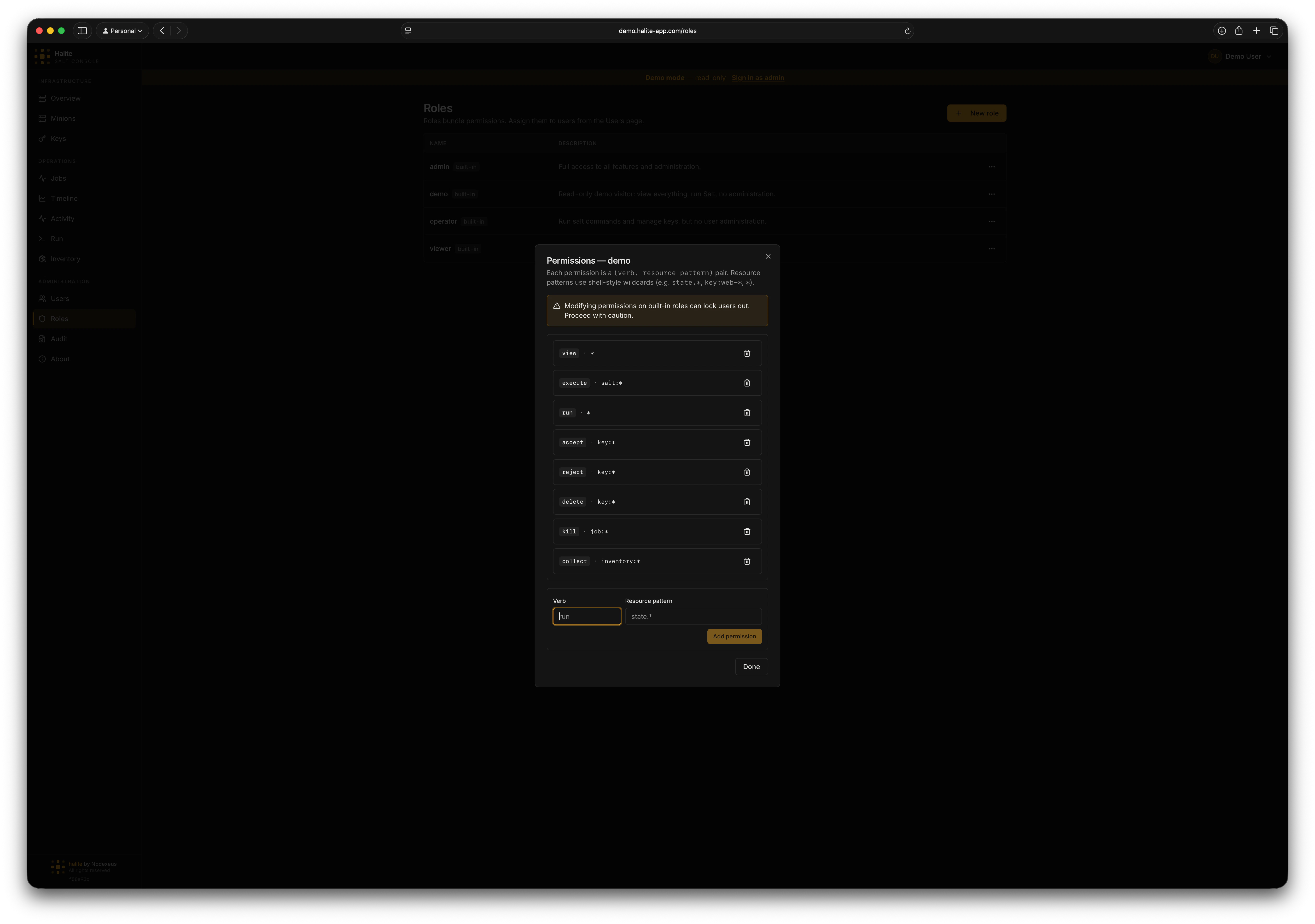 ### Built-in roles
Halite ships three built-in roles that cannot be deleted:
| Role | Permissions (summary) |
| ---------- | ---------------------------------------------------------------------------------- |
| `admin` | `*:*` — full access to everything |
| `operator` | `view:*`, `run:*`, execute and key management, kill jobs |
| `viewer` | `view` on minion, key, job, grain, pillar, event, setting, and inventory resources |
### Custom roles
Create a custom role with `POST /api/roles` (requires `manage_role:role:*`). Provide a `name` (1–64 characters) and optional `description`. Once created, add permissions one at a time with `POST /api/roles/{role_id}/permissions`:
```json theme={"dark"}
{
"verb": "view",
"resource_glob": "inventory:*"
}
```
The `resource_glob` is matched against the resource path at request time using glob semantics. For example, `"job:*"` matches any job resource. Remove an individual permission with `DELETE /api/roles/{role_id}/permissions/{permission_id}`.
Built-in roles cannot be deleted and their permissions cannot be modified.
### Assigning roles to users
`POST /api/users/{user_id}/roles` with `{"role_id": ""}`. A user can hold multiple roles — permissions are unioned across all of them. Remove a role assignment with `DELETE /api/users/{user_id}/roles/{role_id}`.
## Example: creating a read-only inventory auditor
Go to **Settings → Roles** and click **New Role**. Name it `inventory-auditor`.
Add one permission: `verb = view`, `resource_glob = inventory:*`. This is the same permission the **viewer** role has for inventory.
Create a new user account and assign the `inventory-auditor` role. The user can now browse the Inventory page but cannot trigger a refresh or access any other sensitive areas.
## Permissions
### User routes (`/api/users`)
| Route | Required permission |
| --------------------------------------------- | -------------------- |
| `GET /api/users` | `view:user:*` |
| `GET /api/users/{user_id}` | `view:user:*` |
| `POST /api/users` | `manage_user:user:*` |
| `PATCH /api/users/{user_id}` | `manage_user:user:*` |
| `DELETE /api/users/{user_id}` | `manage_user:user:*` |
| `POST /api/users/{user_id}/password` | `manage_user:user:*` |
| `GET /api/users/{user_id}/roles` | `view:user:*` |
| `POST /api/users/{user_id}/roles` | `manage_user:user:*` |
| `DELETE /api/users/{user_id}/roles/{role_id}` | `manage_user:user:*` |
### Role routes (`/api/roles`)
| Route | Required permission |
| --------------------------------------------------------- | -------------------- |
| `GET /api/roles` | `view:role:*` |
| `GET /api/roles/{role_id}` | `view:role:*` |
| `POST /api/roles` | `manage_role:role:*` |
| `PATCH /api/roles/{role_id}` | `manage_role:role:*` |
| `DELETE /api/roles/{role_id}` | `manage_role:role:*` |
| `POST /api/roles/{role_id}/permissions` | `manage_role:role:*` |
| `DELETE /api/roles/{role_id}/permissions/{permission_id}` | `manage_role:role:*` |
Both `manage_user` and `manage_role` are granted exclusively to the built-in **admin** role.
### Built-in roles
Halite ships three built-in roles that cannot be deleted:
| Role | Permissions (summary) |
| ---------- | ---------------------------------------------------------------------------------- |
| `admin` | `*:*` — full access to everything |
| `operator` | `view:*`, `run:*`, execute and key management, kill jobs |
| `viewer` | `view` on minion, key, job, grain, pillar, event, setting, and inventory resources |
### Custom roles
Create a custom role with `POST /api/roles` (requires `manage_role:role:*`). Provide a `name` (1–64 characters) and optional `description`. Once created, add permissions one at a time with `POST /api/roles/{role_id}/permissions`:
```json theme={"dark"}
{
"verb": "view",
"resource_glob": "inventory:*"
}
```
The `resource_glob` is matched against the resource path at request time using glob semantics. For example, `"job:*"` matches any job resource. Remove an individual permission with `DELETE /api/roles/{role_id}/permissions/{permission_id}`.
Built-in roles cannot be deleted and their permissions cannot be modified.
### Assigning roles to users
`POST /api/users/{user_id}/roles` with `{"role_id": ""}`. A user can hold multiple roles — permissions are unioned across all of them. Remove a role assignment with `DELETE /api/users/{user_id}/roles/{role_id}`.
## Example: creating a read-only inventory auditor
Go to **Settings → Roles** and click **New Role**. Name it `inventory-auditor`.
Add one permission: `verb = view`, `resource_glob = inventory:*`. This is the same permission the **viewer** role has for inventory.
Create a new user account and assign the `inventory-auditor` role. The user can now browse the Inventory page but cannot trigger a refresh or access any other sensitive areas.
## Permissions
### User routes (`/api/users`)
| Route | Required permission |
| --------------------------------------------- | -------------------- |
| `GET /api/users` | `view:user:*` |
| `GET /api/users/{user_id}` | `view:user:*` |
| `POST /api/users` | `manage_user:user:*` |
| `PATCH /api/users/{user_id}` | `manage_user:user:*` |
| `DELETE /api/users/{user_id}` | `manage_user:user:*` |
| `POST /api/users/{user_id}/password` | `manage_user:user:*` |
| `GET /api/users/{user_id}/roles` | `view:user:*` |
| `POST /api/users/{user_id}/roles` | `manage_user:user:*` |
| `DELETE /api/users/{user_id}/roles/{role_id}` | `manage_user:user:*` |
### Role routes (`/api/roles`)
| Route | Required permission |
| --------------------------------------------------------- | -------------------- |
| `GET /api/roles` | `view:role:*` |
| `GET /api/roles/{role_id}` | `view:role:*` |
| `POST /api/roles` | `manage_role:role:*` |
| `PATCH /api/roles/{role_id}` | `manage_role:role:*` |
| `DELETE /api/roles/{role_id}` | `manage_role:role:*` |
| `POST /api/roles/{role_id}/permissions` | `manage_role:role:*` |
| `DELETE /api/roles/{role_id}/permissions/{permission_id}` | `manage_role:role:*` |
Both `manage_user` and `manage_role` are granted exclusively to the built-in **admin** role.