> ## Documentation Index
> Fetch the complete documentation index at: https://www.halite-app.com/llms.txt
> Use this file to discover all available pages before exploring further.
# Command Templates
> Save and share reusable Run commands.
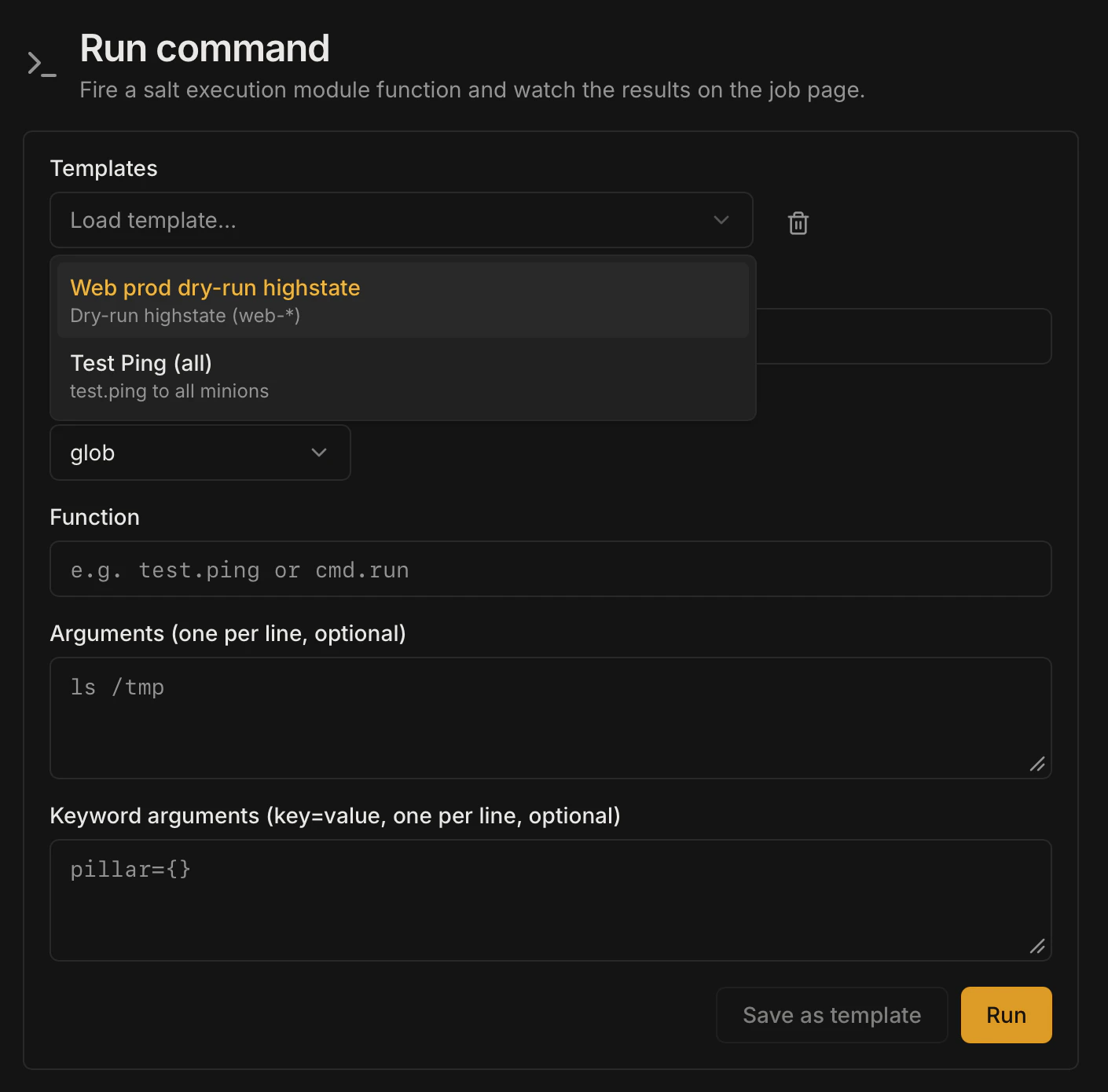
Command Templates let you save a fully configured [Run](./run) command — target, target type, function, args, and kwargs — under a memorable name so you can re-run it in one click without retyping. Templates can be kept private to your account or shared with every user of the console.
 ## Template fields
Each template stores the complete shape of a Run command plus metadata:
| Field | Type | Description |
| ------------- | --------------------- | ------------------------------------------------------------------------------- |
| `name` | string (1–100 chars) | Unique display name within your account |
| `description` | string (0–500 chars) | Optional human-readable description |
| `target` | string (1–1024 chars) | Salt targeting expression |
| `target_type` | string | One of `glob`, `list`, `pcre`, `grain`, `nodegroup`, `compound` |
| `fun` | string | Module function in `module.function` form |
| `args` | array of strings | Positional arguments |
| `kwargs` | object | Keyword arguments |
| `is_shared` | boolean | `false` = private (visible to you only); `true` = shared (visible to all users) |
Template names must be unique per owner — two users can have templates with the same name, but one user cannot have two templates with the same name.
## Creating a template
Navigate to **Run** in the left sidebar and fill in the target, function, and any arguments you want to save.
Click the **Save as template** button (or navigate directly to the Templates page and click **New template**).
Enter a name (required) and an optional description. By default, `is_shared` is `false` — the template is private to your account.
Click **Save**. The template appears in your templates list immediately.
## Running a template
On the Templates page, click **Run** (or the play icon) next to any template. Halite pre-fills the Run form with the template's stored values. You can adjust any field before dispatching — the template is not modified.
## Sharing a template
To share a template with all users, click the **Share** toggle on the template card (or send `PATCH /api/templates/{template_id}` with `{"is_shared": true}`). Shared templates appear in the list for every authenticated user but are marked with the original owner's username.
Shared templates are read-only for other users — only the owner can edit or delete them. This makes them useful for distributing approved run procedures to operators who can execute them but should not modify them.
## Updating a template
The PATCH endpoint (`PATCH /api/templates/{template_id}`) currently supports updating `is_shared` only. To change the target, function, or other fields, delete the template and recreate it.
## Deleting a template
Click the **Delete** button on a template you own. Halite sends `DELETE /api/templates/{template_id}`. You can only delete templates you own — attempting to delete another user's template returns 404 (not 403, to avoid leaking ownership information).
Deletion is permanent. There is no undo. If you have shared a template that other users rely on, notify them before deleting it.
## Example: a shared highstate template
A team lead creates a template called "Full highstate — web tier":
```json theme={"dark"}
{
"name": "Full highstate — web tier",
"description": "Run state.highstate against all web-* minions. Review the job detail before running on production.",
"target": "web-*",
"target_type": "glob",
"fun": "state.highstate",
"args": [],
"kwargs": {},
"is_shared": true
}
```
All team members see this template in their list. Operators click **Run**, review the pre-filled form, and dispatch — no risk of typos in the glob or function name.
## Permissions
The templates routes require only an **authenticated session** (any logged-in user). There is no additional RBAC `require_perm` check on template routes — access is scoped by ownership:
| Action | Requirement |
| ------------------------------------------------ | ---------------------------------------------------------------------------- |
| List templates (`GET /api/templates`) | Authenticated session — returns your own templates plus all shared templates |
| Create a template (`POST /api/templates`) | Authenticated session |
| Delete a template (`DELETE /api/templates/{id}`) | Authenticated session + must own the template |
| Update sharing (`PATCH /api/templates/{id}`) | Authenticated session + must own the template |
Clicking **Run** on a template dispatches a Salt command via `POST /api/run`, which requires `execute:salt:*`. Users without that permission can view templates but cannot run them.
## Template fields
Each template stores the complete shape of a Run command plus metadata:
| Field | Type | Description |
| ------------- | --------------------- | ------------------------------------------------------------------------------- |
| `name` | string (1–100 chars) | Unique display name within your account |
| `description` | string (0–500 chars) | Optional human-readable description |
| `target` | string (1–1024 chars) | Salt targeting expression |
| `target_type` | string | One of `glob`, `list`, `pcre`, `grain`, `nodegroup`, `compound` |
| `fun` | string | Module function in `module.function` form |
| `args` | array of strings | Positional arguments |
| `kwargs` | object | Keyword arguments |
| `is_shared` | boolean | `false` = private (visible to you only); `true` = shared (visible to all users) |
Template names must be unique per owner — two users can have templates with the same name, but one user cannot have two templates with the same name.
## Creating a template
Navigate to **Run** in the left sidebar and fill in the target, function, and any arguments you want to save.
Click the **Save as template** button (or navigate directly to the Templates page and click **New template**).
Enter a name (required) and an optional description. By default, `is_shared` is `false` — the template is private to your account.
Click **Save**. The template appears in your templates list immediately.
## Running a template
On the Templates page, click **Run** (or the play icon) next to any template. Halite pre-fills the Run form with the template's stored values. You can adjust any field before dispatching — the template is not modified.
## Sharing a template
To share a template with all users, click the **Share** toggle on the template card (or send `PATCH /api/templates/{template_id}` with `{"is_shared": true}`). Shared templates appear in the list for every authenticated user but are marked with the original owner's username.
Shared templates are read-only for other users — only the owner can edit or delete them. This makes them useful for distributing approved run procedures to operators who can execute them but should not modify them.
## Updating a template
The PATCH endpoint (`PATCH /api/templates/{template_id}`) currently supports updating `is_shared` only. To change the target, function, or other fields, delete the template and recreate it.
## Deleting a template
Click the **Delete** button on a template you own. Halite sends `DELETE /api/templates/{template_id}`. You can only delete templates you own — attempting to delete another user's template returns 404 (not 403, to avoid leaking ownership information).
Deletion is permanent. There is no undo. If you have shared a template that other users rely on, notify them before deleting it.
## Example: a shared highstate template
A team lead creates a template called "Full highstate — web tier":
```json theme={"dark"}
{
"name": "Full highstate — web tier",
"description": "Run state.highstate against all web-* minions. Review the job detail before running on production.",
"target": "web-*",
"target_type": "glob",
"fun": "state.highstate",
"args": [],
"kwargs": {},
"is_shared": true
}
```
All team members see this template in their list. Operators click **Run**, review the pre-filled form, and dispatch — no risk of typos in the glob or function name.
## Permissions
The templates routes require only an **authenticated session** (any logged-in user). There is no additional RBAC `require_perm` check on template routes — access is scoped by ownership:
| Action | Requirement |
| ------------------------------------------------ | ---------------------------------------------------------------------------- |
| List templates (`GET /api/templates`) | Authenticated session — returns your own templates plus all shared templates |
| Create a template (`POST /api/templates`) | Authenticated session |
| Delete a template (`DELETE /api/templates/{id}`) | Authenticated session + must own the template |
| Update sharing (`PATCH /api/templates/{id}`) | Authenticated session + must own the template |
Clicking **Run** on a template dispatches a Salt command via `POST /api/run`, which requires `execute:salt:*`. Users without that permission can view templates but cannot run them.