> ## Documentation Index
> Fetch the complete documentation index at: https://www.halite-app.com/llms.txt
> Use this file to discover all available pages before exploring further.
# Settings
> Configure the Salt-API connection and pollers.
The Settings page is where you connect Halite to your Salt master and tune background poller intervals. All settings are stored in the database (the singleton `AppSettings` row) and take effect immediately without a container restart — saving a change calls `runtime.reload()`, which tears down the existing Salt client and schedulers and rebuilds them from the new values.
The Settings page is restricted to users with the `edit:settings:*` permission. Only the built-in **admin** role has this permission.
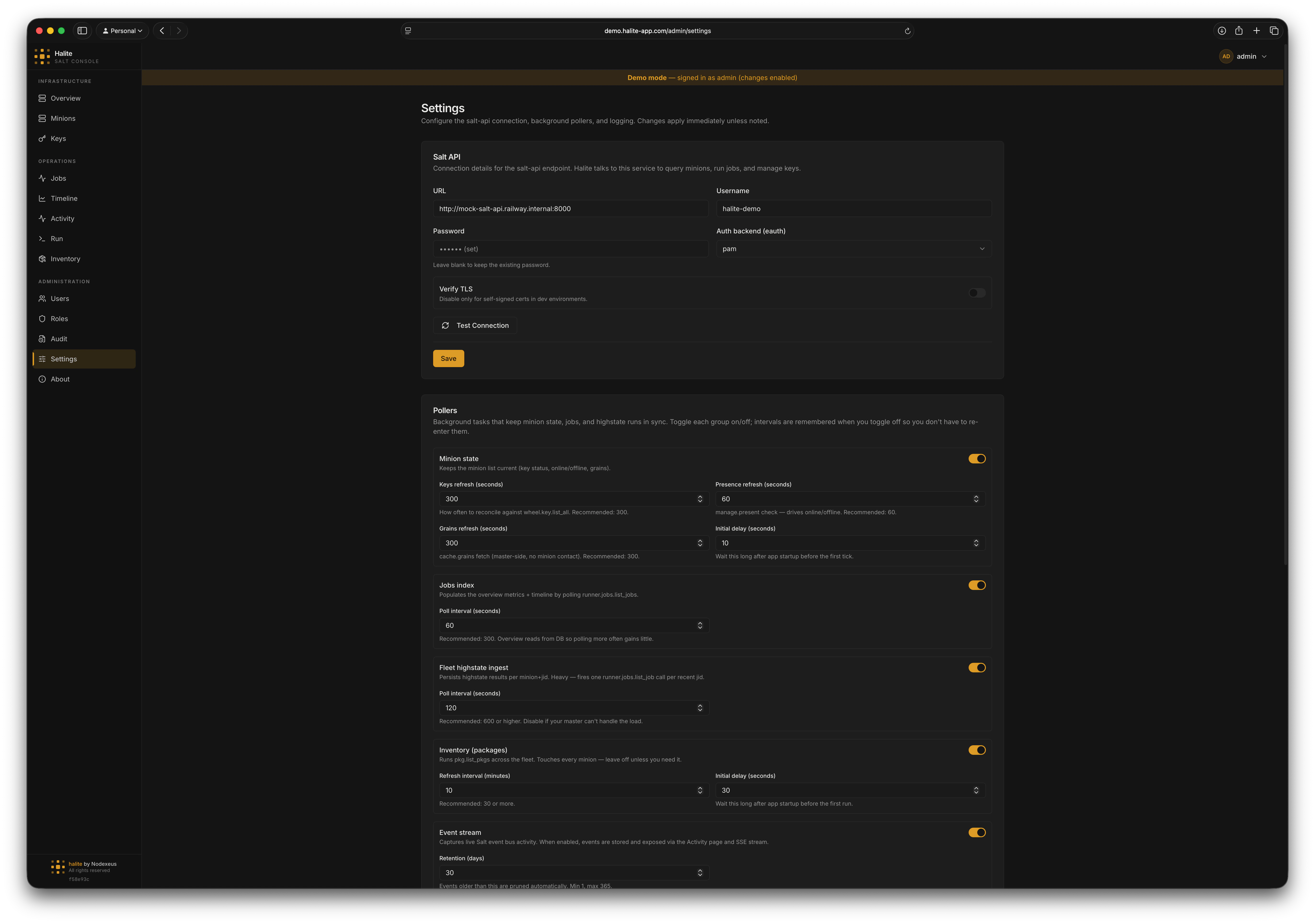 ## Salt API connection
These fields configure how Halite authenticates to `salt-api`.
The full URL of your `salt-api` instance, including scheme and port (e.g. `https://salt.internal:8000`). Clearing this field disables the Salt connection — all background schedulers stop and salt-backed endpoints return empty or degraded responses.
The Salt service account username. Maximum 255 characters.
The service account password. The password is encrypted at rest using the server's `COOKIE_SECRET` and is never returned by the API — only a boolean `password_set` flag is returned so the UI can show `(set)` without exposing the value.
The Salt external auth backend. Accepted values: `pam`, `sharedsecret`, `ldap`, `file`, `auto`.
Whether to verify the `salt-api` TLS certificate. Set to `false` only if your salt-api uses a self-signed certificate and you accept the risk.
### Testing the connection
Before saving, click **Test Connection** to validate the credentials without persisting them (`POST /api/admin/settings/test-salt`). The response includes `ok`, a `detail` message, and a `minion_count` when `manage.present` succeeds. You can also test the currently-saved credentials with `POST /api/admin/settings/test-salt-saved` (the password is read from the database, not re-entered).
## Poller intervals
These fields control how often background tasks run. Set any interval to `0` to disable that scheduler.
How often (in minutes) the inventory scheduler collects `pkg.list_pkgs` from the entire fleet. `0` disables the scheduler. Range: 0–1440.
Seconds to wait after startup before the first inventory collection run. Range: 0–3600.
How often (in seconds) the fleet scheduler looks for new `state.*` JIDs and ingests highstate results. `0` disables. Range: 0–86400.
How often (in seconds) the jobs scheduler polls for new job index entries. `0` disables. Range: 0–86400.
How often (in seconds) the minion scheduler refreshes key state for all minions. Range: 0–86400.
How often (in seconds) the minion scheduler refreshes online/offline presence via `manage.present`. Range: 0–86400.
How often (in seconds) the minion scheduler refreshes grains for accepted online minions. Range: 0–86400.
Seconds to wait after startup before the minion scheduler's first tick. Range: 0–3600.
## Event stream
The **Event stream** controls live at the bottom of the Pollers section. They drive the [Activity](/features/activity) feed, which tails the Salt event bus instead of polling. Saving the Pollers section calls `runtime.reload()`, so toggling the stream starts or stops the event consumer with no restart.
Master switch for the live event stream. When on, Halite holds a long-lived connection to salt-api's `/events` endpoint, captures job / key / minion events, stores them, and exposes them via the Activity page and SSE stream. When off, no events are captured and the Activity page is empty.
How many days of captured events to keep. The event consumer prunes rows older than this. Range: 1–365.
## Activity widget
These fields configure the **Recent activity** widget on the [Overview](/features/overview#recent-activity) dashboard. They are display-only — saving this section does **not** trigger a `runtime.reload()`, and the values are readable by every authenticated user (via `GET /api/activity/widget-config`) so the widget renders the same way for everyone.
Hide job dispatch (`job.new`) events from the widget, leaving only completions and outcomes.
Hide routine successes — successful job returns that made no changes.
Include job events in the widget.
Include key events in the widget.
Include minion events in the widget.
How many events to list in the widget. Range: 1–50.
The time window (in minutes) the heartbeat indicator counts events over. Range: 5–1440.
## Logging
The backend log format. Accepted values: `json` (structured JSON lines, best for log aggregators) or `text` (human-readable). Note that current builds initialize logging with a hardcoded `json` format at startup, so this setting is not applied to the running process — a container restart would be required once it is wired up.
## How live reload works
When you save the **Salt** or **Pollers** sections, Halite calls `runtime.reload(db)` to rewire the live Salt client, schedulers, and event consumer with no restart. Saving the **Activity widget** or **Logging** sections does **not** trigger a reload — those are display-only.
1. All running schedulers (minion, fleet, inventory, jobs) and the event consumer are cancelled and awaited.
2. The Salt client is closed.
3. The `AppSettings` row is re-read from the database.
4. If `salt_api_url`, `salt_api_username`, and the decrypted password are all present, a new `SaltAPIClient` is created and logged in.
5. Any schedulers whose interval is `> 0` are started fresh with the new settings, and — if `event_stream_enabled` is on — the event consumer is started.
If the Salt credentials are incomplete or the login fails, the client remains `None` and all schedulers stay stopped. Salt-backed endpoints (minion presence, job dispatch, inventory refresh, etc.) degrade gracefully — they return empty results rather than hard-failing.
## Walkthrough: connecting to a Salt master
Click **Settings** in the left sidebar. You need the **admin** role.
In the **Salt API** section, enter the full URL of your `salt-api` instance, e.g. `https://salt.example.com:8000`.
Enter the service account `username` and `password`. Set `eauth` to the backend your Salt master uses (typically `pam`). If your salt-api uses a self-signed certificate, toggle **Verify TLS** off.
Click **Test Connection**. If the status shows `ok: true` with a minion count, the credentials are valid.
Click **Save Salt Settings**. Halite immediately re-wires the live Salt client — you do not need to restart.
In the **Pollers** section, set non-zero values for the schedulers you want. For example, set `minion_state_presence_interval_seconds = 60` to get live online/offline status every minute. Click **Save Poller Settings**.
## Permissions
| Route | Required permission |
| ------------------------------------------ | -------------------------- |
| `GET /api/admin/settings/status` | Authenticated session only |
| `GET /api/admin/settings` | `edit:settings:*` |
| `PUT /api/admin/settings/salt` | `edit:settings:*` |
| `PUT /api/admin/settings/pollers` | `edit:settings:*` |
| `PUT /api/admin/settings/widget` | `edit:settings:*` |
| `GET /api/activity/widget-config` | Authenticated session only |
| `PUT /api/admin/settings/logging` | `edit:settings:*` |
| `POST /api/admin/settings/test-salt` | `edit:settings:*` |
| `POST /api/admin/settings/test-salt-saved` | `edit:settings:*` |
## Salt API connection
These fields configure how Halite authenticates to `salt-api`.
The full URL of your `salt-api` instance, including scheme and port (e.g. `https://salt.internal:8000`). Clearing this field disables the Salt connection — all background schedulers stop and salt-backed endpoints return empty or degraded responses.
The Salt service account username. Maximum 255 characters.
The service account password. The password is encrypted at rest using the server's `COOKIE_SECRET` and is never returned by the API — only a boolean `password_set` flag is returned so the UI can show `(set)` without exposing the value.
The Salt external auth backend. Accepted values: `pam`, `sharedsecret`, `ldap`, `file`, `auto`.
Whether to verify the `salt-api` TLS certificate. Set to `false` only if your salt-api uses a self-signed certificate and you accept the risk.
### Testing the connection
Before saving, click **Test Connection** to validate the credentials without persisting them (`POST /api/admin/settings/test-salt`). The response includes `ok`, a `detail` message, and a `minion_count` when `manage.present` succeeds. You can also test the currently-saved credentials with `POST /api/admin/settings/test-salt-saved` (the password is read from the database, not re-entered).
## Poller intervals
These fields control how often background tasks run. Set any interval to `0` to disable that scheduler.
How often (in minutes) the inventory scheduler collects `pkg.list_pkgs` from the entire fleet. `0` disables the scheduler. Range: 0–1440.
Seconds to wait after startup before the first inventory collection run. Range: 0–3600.
How often (in seconds) the fleet scheduler looks for new `state.*` JIDs and ingests highstate results. `0` disables. Range: 0–86400.
How often (in seconds) the jobs scheduler polls for new job index entries. `0` disables. Range: 0–86400.
How often (in seconds) the minion scheduler refreshes key state for all minions. Range: 0–86400.
How often (in seconds) the minion scheduler refreshes online/offline presence via `manage.present`. Range: 0–86400.
How often (in seconds) the minion scheduler refreshes grains for accepted online minions. Range: 0–86400.
Seconds to wait after startup before the minion scheduler's first tick. Range: 0–3600.
## Event stream
The **Event stream** controls live at the bottom of the Pollers section. They drive the [Activity](/features/activity) feed, which tails the Salt event bus instead of polling. Saving the Pollers section calls `runtime.reload()`, so toggling the stream starts or stops the event consumer with no restart.
Master switch for the live event stream. When on, Halite holds a long-lived connection to salt-api's `/events` endpoint, captures job / key / minion events, stores them, and exposes them via the Activity page and SSE stream. When off, no events are captured and the Activity page is empty.
How many days of captured events to keep. The event consumer prunes rows older than this. Range: 1–365.
## Activity widget
These fields configure the **Recent activity** widget on the [Overview](/features/overview#recent-activity) dashboard. They are display-only — saving this section does **not** trigger a `runtime.reload()`, and the values are readable by every authenticated user (via `GET /api/activity/widget-config`) so the widget renders the same way for everyone.
Hide job dispatch (`job.new`) events from the widget, leaving only completions and outcomes.
Hide routine successes — successful job returns that made no changes.
Include job events in the widget.
Include key events in the widget.
Include minion events in the widget.
How many events to list in the widget. Range: 1–50.
The time window (in minutes) the heartbeat indicator counts events over. Range: 5–1440.
## Logging
The backend log format. Accepted values: `json` (structured JSON lines, best for log aggregators) or `text` (human-readable). Note that current builds initialize logging with a hardcoded `json` format at startup, so this setting is not applied to the running process — a container restart would be required once it is wired up.
## How live reload works
When you save the **Salt** or **Pollers** sections, Halite calls `runtime.reload(db)` to rewire the live Salt client, schedulers, and event consumer with no restart. Saving the **Activity widget** or **Logging** sections does **not** trigger a reload — those are display-only.
1. All running schedulers (minion, fleet, inventory, jobs) and the event consumer are cancelled and awaited.
2. The Salt client is closed.
3. The `AppSettings` row is re-read from the database.
4. If `salt_api_url`, `salt_api_username`, and the decrypted password are all present, a new `SaltAPIClient` is created and logged in.
5. Any schedulers whose interval is `> 0` are started fresh with the new settings, and — if `event_stream_enabled` is on — the event consumer is started.
If the Salt credentials are incomplete or the login fails, the client remains `None` and all schedulers stay stopped. Salt-backed endpoints (minion presence, job dispatch, inventory refresh, etc.) degrade gracefully — they return empty results rather than hard-failing.
## Walkthrough: connecting to a Salt master
Click **Settings** in the left sidebar. You need the **admin** role.
In the **Salt API** section, enter the full URL of your `salt-api` instance, e.g. `https://salt.example.com:8000`.
Enter the service account `username` and `password`. Set `eauth` to the backend your Salt master uses (typically `pam`). If your salt-api uses a self-signed certificate, toggle **Verify TLS** off.
Click **Test Connection**. If the status shows `ok: true` with a minion count, the credentials are valid.
Click **Save Salt Settings**. Halite immediately re-wires the live Salt client — you do not need to restart.
In the **Pollers** section, set non-zero values for the schedulers you want. For example, set `minion_state_presence_interval_seconds = 60` to get live online/offline status every minute. Click **Save Poller Settings**.
## Permissions
| Route | Required permission |
| ------------------------------------------ | -------------------------- |
| `GET /api/admin/settings/status` | Authenticated session only |
| `GET /api/admin/settings` | `edit:settings:*` |
| `PUT /api/admin/settings/salt` | `edit:settings:*` |
| `PUT /api/admin/settings/pollers` | `edit:settings:*` |
| `PUT /api/admin/settings/widget` | `edit:settings:*` |
| `GET /api/activity/widget-config` | Authenticated session only |
| `PUT /api/admin/settings/logging` | `edit:settings:*` |
| `POST /api/admin/settings/test-salt` | `edit:settings:*` |
| `POST /api/admin/settings/test-salt-saved` | `edit:settings:*` |