> ## Documentation Index
> Fetch the complete documentation index at: https://www.halite-app.com/llms.txt
> Use this file to discover all available pages before exploring further.
# Run
> Dispatch Salt execution-module functions against any target.
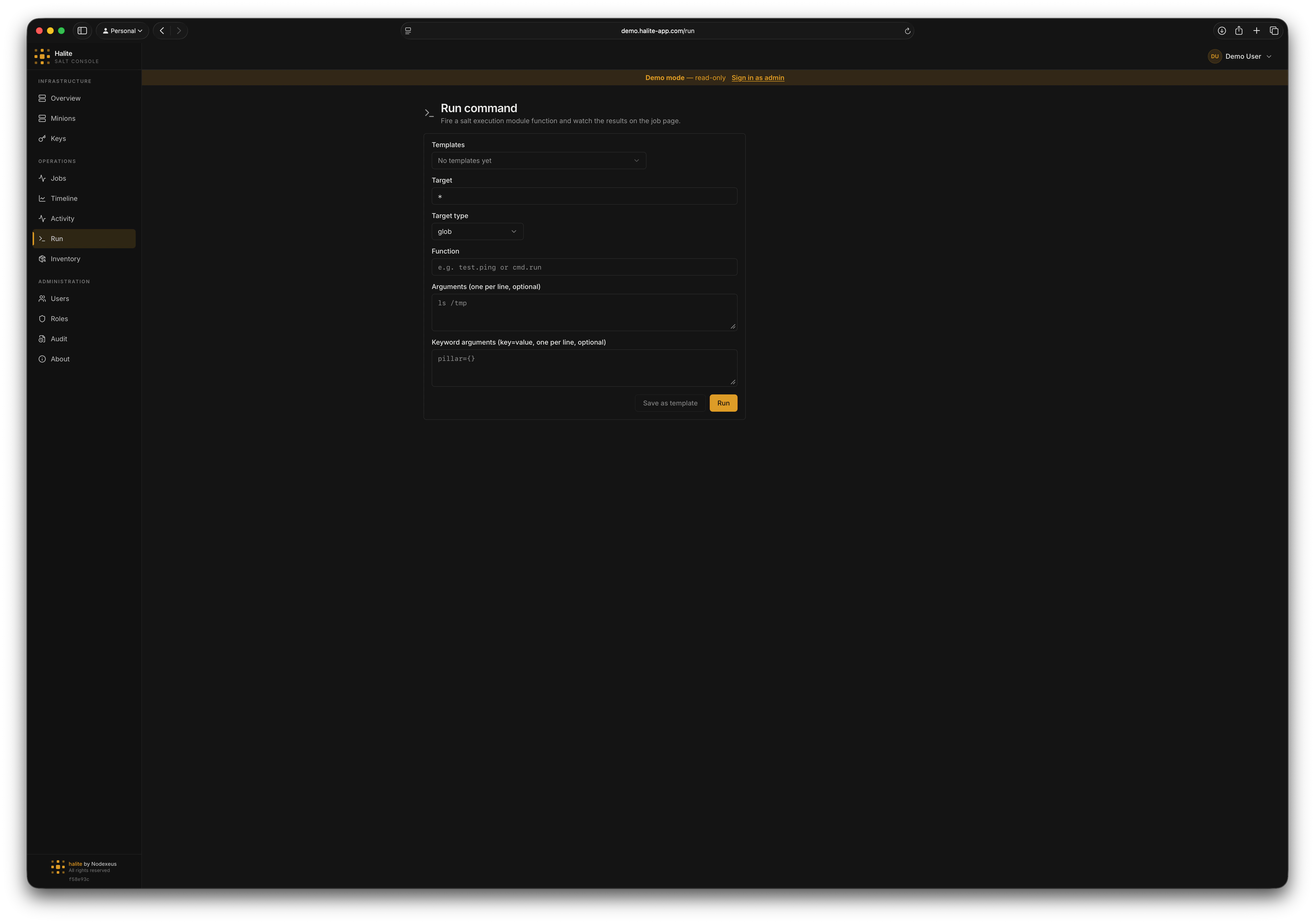
The Run page lets you dispatch any Salt execution-module function against any target without dropping to the command line. It supports every Salt targeting method, optional positional arguments and keyword arguments, and returns the Salt job ID immediately so you can track the job on the [Jobs](./jobs) page.
Every run command is recorded in the [audit log](/concepts/audit-log) with the full request payload.
 ## Request shape
When you submit the Run form, Halite sends a `POST /api/run` request with the following JSON body (defined by `RunCommandIn`):
The targeting expression. What this means depends on `target_type` — a glob pattern, comma-separated minion IDs, a PCRE regex, a grain match, a nodegroup name, or a compound expression.
How to interpret `target`. One of:
| Value | Meaning |
| ----------- | ------------------------------------------------------------- |
| `glob` | Shell glob matched against minion IDs (e.g. `web-*`) |
| `list` | Comma-separated list of exact minion IDs |
| `pcre` | Perl-compatible regular expression matched against minion IDs |
| `grain` | Grain glob match (e.g. `os:Ubuntu`) |
| `nodegroup` | Named nodegroup defined in the master config |
| `compound` | Compound matcher combining multiple targeting methods |
The execution function in `module.function` form (e.g. `test.ping`, `pkg.version`, `state.highstate`). The field validates that the value matches the `module.function` pattern.
Positional arguments passed to the function. Each element is a string. Defaults to `[]`.
Keyword arguments passed to the function as a key/value object. Defaults to `{}`.
### Response
A successful dispatch returns HTTP 202 Accepted with the following body (defined by `RunCommandOut`):
```json theme={"dark"}
{
"jid": "20240101120000000000",
"minions": ["web-01", "web-02", "web-03"]
}
```
* `jid` — the Salt job ID; use this to look up results on the [Jobs](./jobs) page.
* `minions` — the list of minion IDs that were targeted.
## Function autocomplete
The function input field is backed by the Salt function catalog, served from `GET /api/salt/functions`. The catalog lists every execution function the Salt master knows about, cached for one hour to avoid hammering salt-api on every keystroke. Any authenticated user can access the catalog.
## Examples
### Example 1: ping all minions
1. Set **Target** to `*`
2. Leave **Target type** as `glob`
3. Set **Function** to `test.ping`
4. Leave **Args** and **Kwargs** empty
5. Click **Run**
```json theme={"dark"}
{
"target": "*",
"target_type": "glob",
"fun": "test.ping",
"args": [],
"kwargs": {}
}
```
```json theme={"dark"}
{
"jid": "20240101120000000000",
"minions": ["db-01", "web-01", "web-02"]
}
```
### Example 2: check the installed version of nginx on web servers
1. Set **Target** to `web-*`
2. Leave **Target type** as `glob`
3. Set **Function** to `pkg.version`
4. Add `nginx` to **Args**
5. Click **Run**
```json theme={"dark"}
{
"target": "web-*",
"target_type": "glob",
"fun": "pkg.version",
"args": ["nginx"],
"kwargs": {}
}
```
```json theme={"dark"}
{
"jid": "20240101120001000000",
"minions": ["web-01", "web-02"]
}
```
Open the Jobs page and find the JID to see the version string returned by each minion.
## Saving as a template
If you run the same command regularly, save it as a [Command Template](./templates). Click **Save as template** in the Run form after filling in the fields. Templates can be kept private or shared with your team.
## Permissions
| Action | Permission |
| ----------------------------------------------- | ------------------------------------------ |
| Dispatch a run command (`POST /api/run`) | `execute:salt:*` |
| List Salt functions (`GET /api/salt/functions`) | Authenticated session only (no RBAC check) |
The built-in **operator** role has `execute:salt:*`. The built-in **viewer** role does not — viewers can browse results but cannot dispatch jobs.
For custom roles and permission scoping, see [RBAC](/concepts/rbac).
## Request shape
When you submit the Run form, Halite sends a `POST /api/run` request with the following JSON body (defined by `RunCommandIn`):
The targeting expression. What this means depends on `target_type` — a glob pattern, comma-separated minion IDs, a PCRE regex, a grain match, a nodegroup name, or a compound expression.
How to interpret `target`. One of:
| Value | Meaning |
| ----------- | ------------------------------------------------------------- |
| `glob` | Shell glob matched against minion IDs (e.g. `web-*`) |
| `list` | Comma-separated list of exact minion IDs |
| `pcre` | Perl-compatible regular expression matched against minion IDs |
| `grain` | Grain glob match (e.g. `os:Ubuntu`) |
| `nodegroup` | Named nodegroup defined in the master config |
| `compound` | Compound matcher combining multiple targeting methods |
The execution function in `module.function` form (e.g. `test.ping`, `pkg.version`, `state.highstate`). The field validates that the value matches the `module.function` pattern.
Positional arguments passed to the function. Each element is a string. Defaults to `[]`.
Keyword arguments passed to the function as a key/value object. Defaults to `{}`.
### Response
A successful dispatch returns HTTP 202 Accepted with the following body (defined by `RunCommandOut`):
```json theme={"dark"}
{
"jid": "20240101120000000000",
"minions": ["web-01", "web-02", "web-03"]
}
```
* `jid` — the Salt job ID; use this to look up results on the [Jobs](./jobs) page.
* `minions` — the list of minion IDs that were targeted.
## Function autocomplete
The function input field is backed by the Salt function catalog, served from `GET /api/salt/functions`. The catalog lists every execution function the Salt master knows about, cached for one hour to avoid hammering salt-api on every keystroke. Any authenticated user can access the catalog.
## Examples
### Example 1: ping all minions
1. Set **Target** to `*`
2. Leave **Target type** as `glob`
3. Set **Function** to `test.ping`
4. Leave **Args** and **Kwargs** empty
5. Click **Run**
```json theme={"dark"}
{
"target": "*",
"target_type": "glob",
"fun": "test.ping",
"args": [],
"kwargs": {}
}
```
```json theme={"dark"}
{
"jid": "20240101120000000000",
"minions": ["db-01", "web-01", "web-02"]
}
```
### Example 2: check the installed version of nginx on web servers
1. Set **Target** to `web-*`
2. Leave **Target type** as `glob`
3. Set **Function** to `pkg.version`
4. Add `nginx` to **Args**
5. Click **Run**
```json theme={"dark"}
{
"target": "web-*",
"target_type": "glob",
"fun": "pkg.version",
"args": ["nginx"],
"kwargs": {}
}
```
```json theme={"dark"}
{
"jid": "20240101120001000000",
"minions": ["web-01", "web-02"]
}
```
Open the Jobs page and find the JID to see the version string returned by each minion.
## Saving as a template
If you run the same command regularly, save it as a [Command Template](./templates). Click **Save as template** in the Run form after filling in the fields. Templates can be kept private or shared with your team.
## Permissions
| Action | Permission |
| ----------------------------------------------- | ------------------------------------------ |
| Dispatch a run command (`POST /api/run`) | `execute:salt:*` |
| List Salt functions (`GET /api/salt/functions`) | Authenticated session only (no RBAC check) |
The built-in **operator** role has `execute:salt:*`. The built-in **viewer** role does not — viewers can browse results but cannot dispatch jobs.
For custom roles and permission scoping, see [RBAC](/concepts/rbac).