> ## Documentation Index
> Fetch the complete documentation index at: https://www.halite-app.com/llms.txt
> Use this file to discover all available pages before exploring further.
# Minions
> Live minion status and grains.
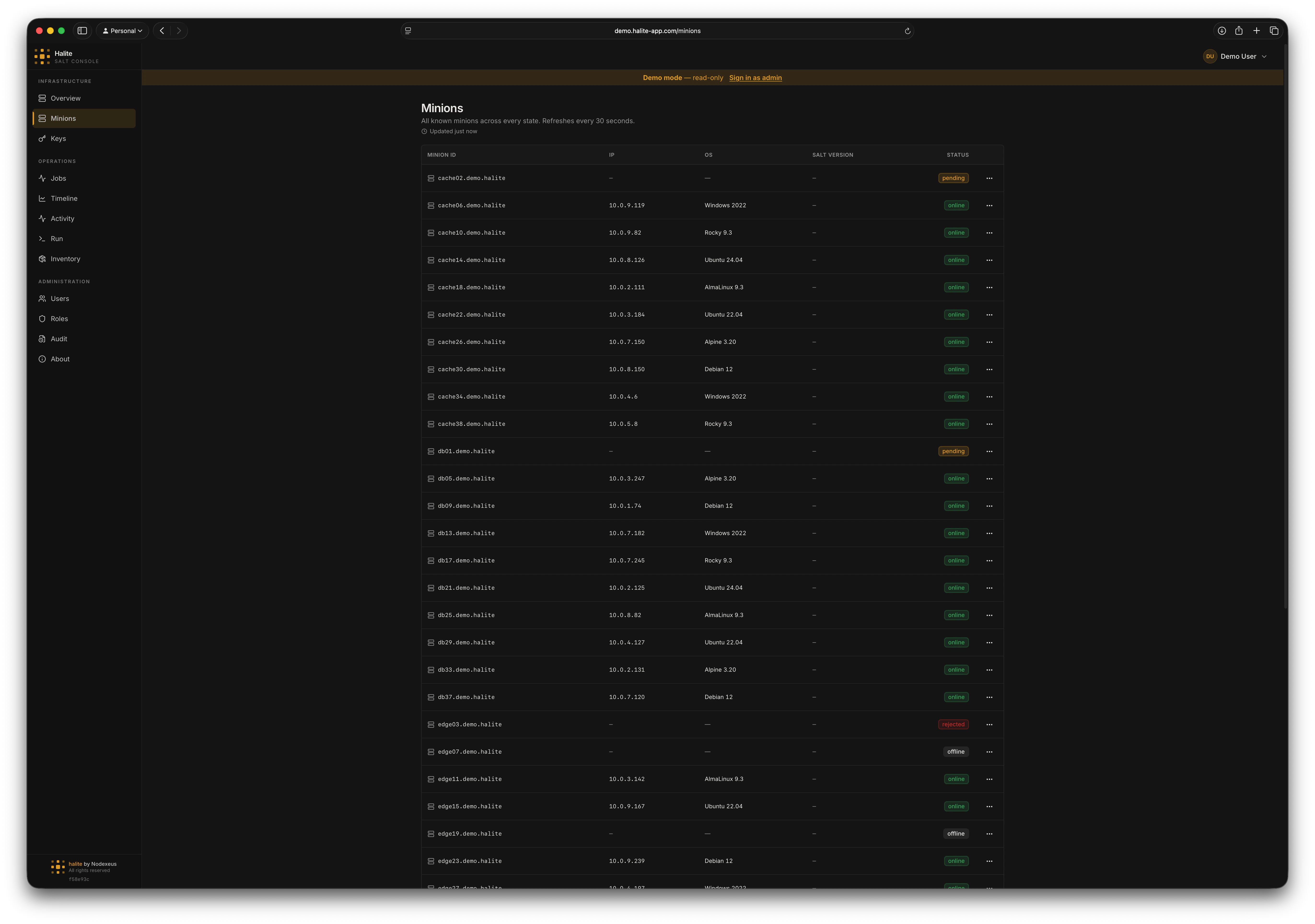
The Minions page shows every minion your Salt master knows about, their current online/offline status, primary IP address, and key OS grains. Data is served from the **minion snapshot table** — a local database kept current by Halite's background pollers — so the page loads instantly even on large fleets.
For a detailed explanation of how polling and the snapshot table work, see [How Halite Works](/concepts/how-it-works).
 ## Minion statuses
Each minion row carries one of five statuses, derived from both its key-approval state and its online presence:
| Status | Meaning |
| ---------- | -------------------------------------------------------------------------- |
| `online` | Key is accepted and the minion responded to the most recent presence check |
| `offline` | Key is accepted but the minion did not respond |
| `pending` | Key is in the `minions_pre` bucket — awaiting approval |
| `rejected` | Key is in the `minions_rejected` bucket |
| `denied` | Key is in the `minions_denied` bucket |
Only `accepted` minions can receive jobs. `pending`, `rejected`, and `denied` minions appear in the list so you can act on their keys from the [Keys](./keys) page without switching views.
## Snapshot freshness
The snapshot row for each minion is updated by three separate pollers: keys, presence, and grains. If the oldest of those three timestamps is more than 10 minutes old, the page shows a **stale** warning badge. You can adjust poller cadences in **Settings → Pollers**.
## Viewing a minion
Click **Minions** in the left sidebar. The page loads immediately from the local snapshot database.
Use the search field to filter by minion ID, OS, or IP address. The list is sorted alphabetically by minion ID.
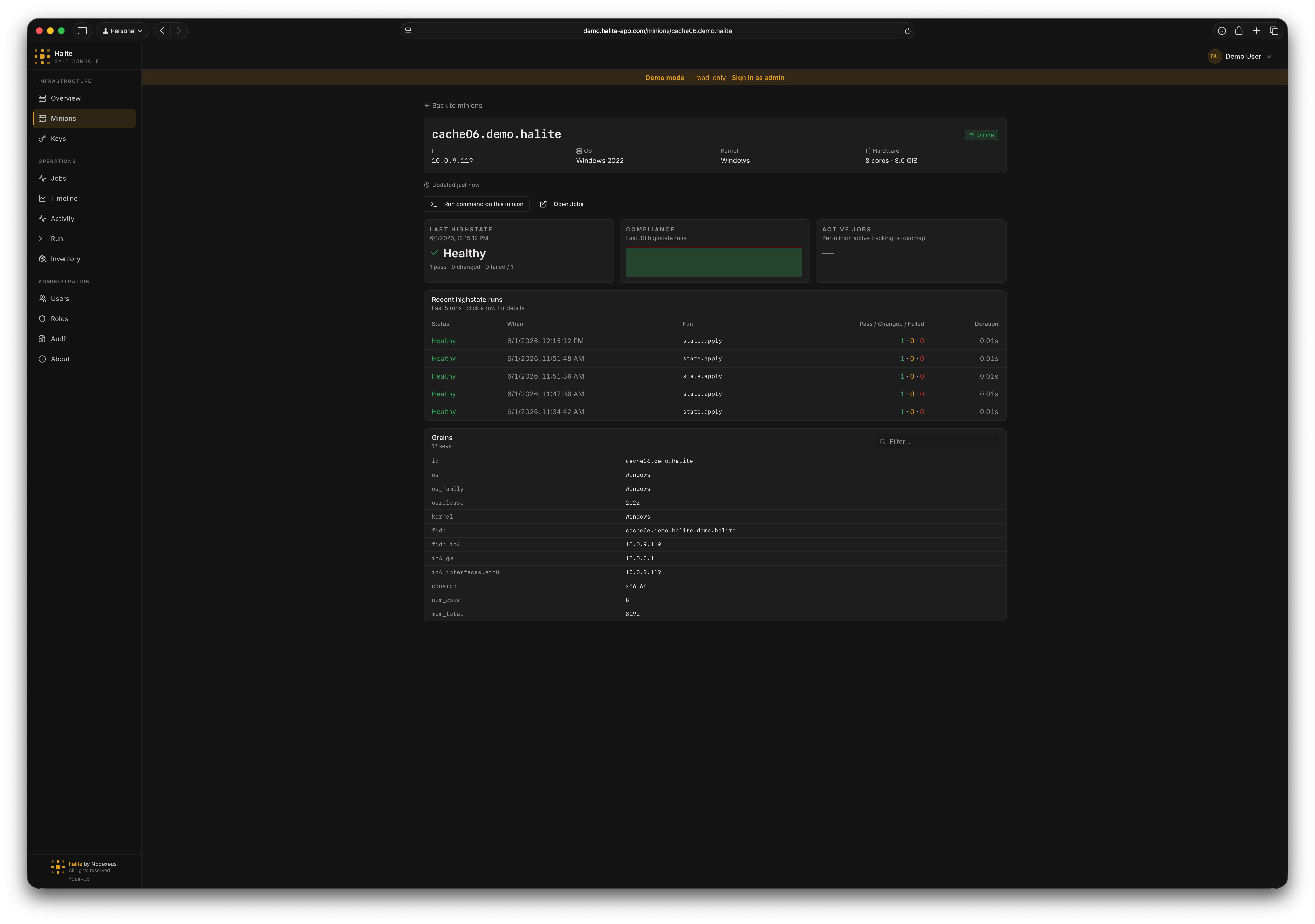
Clicking a row opens the **minion detail panel**, which shows:
* Full status and primary IP
* Denormalized OS grains: `os`, `os_family`, `osrelease`, `kernel`, `kernelrelease`
* Virtualisation type (`virtual` grain)
* CPU count and total memory
* Salt version
* The full raw grains dictionary (expandable)
* Recent run history and compliance trend
## Minion statuses
Each minion row carries one of five statuses, derived from both its key-approval state and its online presence:
| Status | Meaning |
| ---------- | -------------------------------------------------------------------------- |
| `online` | Key is accepted and the minion responded to the most recent presence check |
| `offline` | Key is accepted but the minion did not respond |
| `pending` | Key is in the `minions_pre` bucket — awaiting approval |
| `rejected` | Key is in the `minions_rejected` bucket |
| `denied` | Key is in the `minions_denied` bucket |
Only `accepted` minions can receive jobs. `pending`, `rejected`, and `denied` minions appear in the list so you can act on their keys from the [Keys](./keys) page without switching views.
## Snapshot freshness
The snapshot row for each minion is updated by three separate pollers: keys, presence, and grains. If the oldest of those three timestamps is more than 10 minutes old, the page shows a **stale** warning badge. You can adjust poller cadences in **Settings → Pollers**.
## Viewing a minion
Click **Minions** in the left sidebar. The page loads immediately from the local snapshot database.
Use the search field to filter by minion ID, OS, or IP address. The list is sorted alphabetically by minion ID.
Clicking a row opens the **minion detail panel**, which shows:
* Full status and primary IP
* Denormalized OS grains: `os`, `os_family`, `osrelease`, `kernel`, `kernelrelease`
* Virtualisation type (`virtual` grain)
* CPU count and total memory
* Salt version
* The full raw grains dictionary (expandable)
* Recent run history and compliance trend
 ## Grains data
Halite caches grains for **accepted online minions** only. The pollers pull grains from the Salt master's grain cache (not by re-targeting the minion), so grains data does not require the minion to be responsive at query time.
The following denormalized columns are stored directly on the snapshot row for fast list-view rendering: `os`, `os_family`, `osrelease`, `kernel`, `kernelrelease`, `virtual` (as `virtual_type`), `num_cpus`, `mem_total_mb`, `saltversion`. The full `grains` JSONB column holds the complete grain dictionary for detail views.
## Example: finding all Debian minions
On the Minions page, type `Debian` in the search box. The table filters to rows where `os_family` or `os` contains "Debian", letting you quickly assess how many Debian hosts are online before running a package upgrade.
## Permissions
All minion routes require `view:minion:*`.
| Route | Permission |
| ----------------------------------------- | --------------- |
| `GET /api/minions` | `view:minion:*` |
| `GET /api/minions/{minion_id}` | `view:minion:*` |
| `GET /api/minions/{minion_id}/runs` | `view:minion:*` |
| `GET /api/minions/{minion_id}/compliance` | `view:minion:*` |
The built-in **viewer** role includes `view:minion:*`, so all users can see the minion list by default.
## Grains data
Halite caches grains for **accepted online minions** only. The pollers pull grains from the Salt master's grain cache (not by re-targeting the minion), so grains data does not require the minion to be responsive at query time.
The following denormalized columns are stored directly on the snapshot row for fast list-view rendering: `os`, `os_family`, `osrelease`, `kernel`, `kernelrelease`, `virtual` (as `virtual_type`), `num_cpus`, `mem_total_mb`, `saltversion`. The full `grains` JSONB column holds the complete grain dictionary for detail views.
## Example: finding all Debian minions
On the Minions page, type `Debian` in the search box. The table filters to rows where `os_family` or `os` contains "Debian", letting you quickly assess how many Debian hosts are online before running a package upgrade.
## Permissions
All minion routes require `view:minion:*`.
| Route | Permission |
| ----------------------------------------- | --------------- |
| `GET /api/minions` | `view:minion:*` |
| `GET /api/minions/{minion_id}` | `view:minion:*` |
| `GET /api/minions/{minion_id}/runs` | `view:minion:*` |
| `GET /api/minions/{minion_id}/compliance` | `view:minion:*` |
The built-in **viewer** role includes `view:minion:*`, so all users can see the minion list by default.