> ## Documentation Index
> Fetch the complete documentation index at: https://www.halite-app.com/llms.txt
> Use this file to discover all available pages before exploring further.
# Keys
> Accept, reject, or delete minion keys.
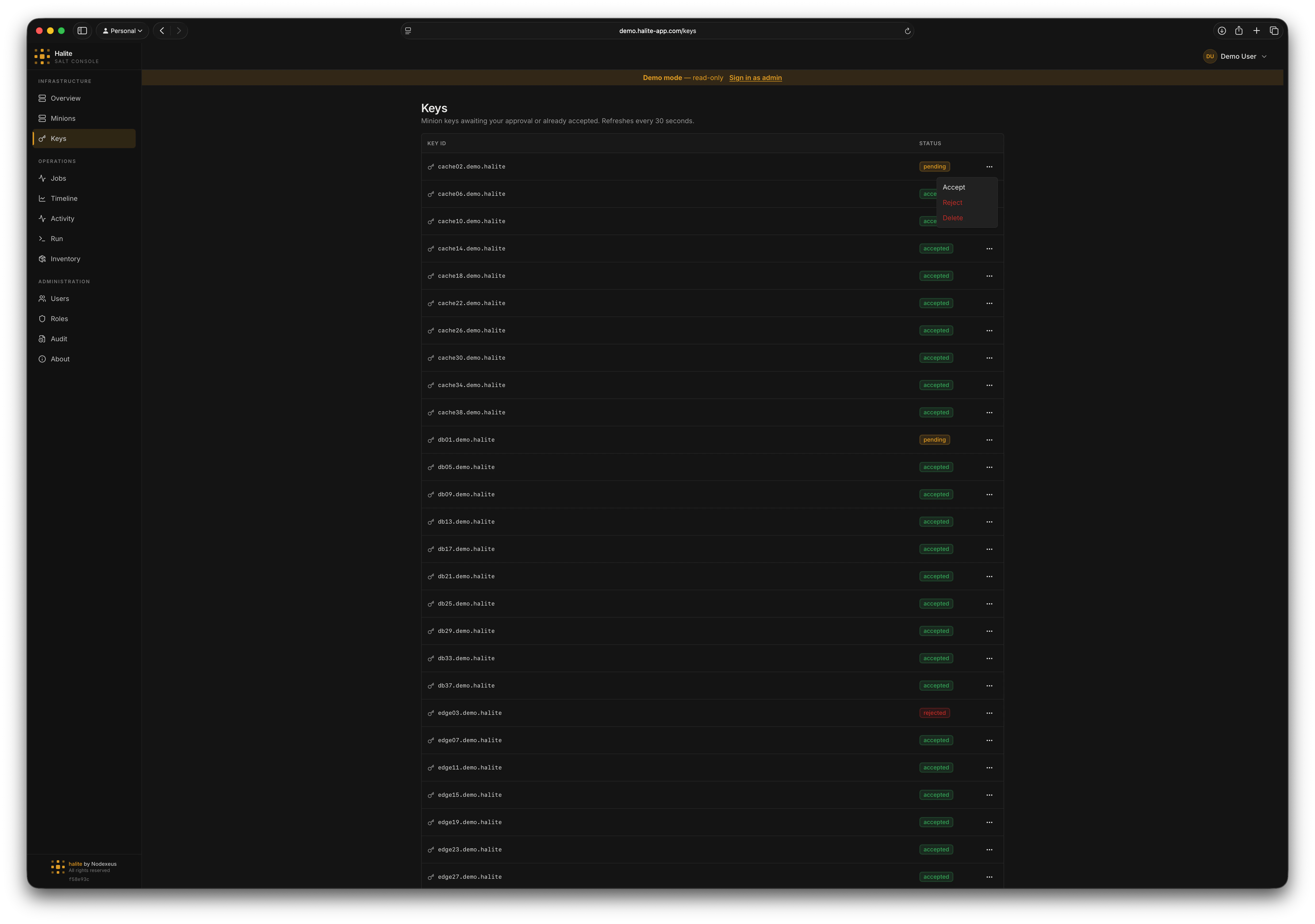
Every minion must have its public key accepted by the Salt master before it can receive commands. The Keys page surfaces all keys known to the master — grouped by approval state — and lets you accept, reject, or delete them without dropping to the command line.
Key actions are executed live against the Salt master via salt-api. Every action is written to the [audit log](/concepts/audit-log).
 ## Key states
Halite maps the Salt master's internal key buckets to four human-readable states:
| State | Salt bucket | Meaning |
| ---------- | ------------------ | -------------------------------------------------------------- |
| `accepted` | `minions` | Key is approved; the minion can receive jobs |
| `pending` | `minions_pre` | Minion has connected but the key has not been approved yet |
| `rejected` | `minions_rejected` | Key was explicitly rejected; the minion cannot receive jobs |
| `denied` | `minions_denied` | Key was auto-denied (e.g. the master is in `auto_reject` mode) |
Only minions with `accepted` keys can receive Salt commands. Pending, rejected, and denied minions show up in the list so you can act on them without leaving the console.
## Key actions
| Action | HTTP call | Effect on the master |
| ---------- | -------------------------------- | --------------------------------------------- |
| **Accept** | `POST /api/keys/{key_id}/accept` | Moves the key from `minions_pre` to `minions` |
| **Reject** | `POST /api/keys/{key_id}/reject` | Moves the key to `minions_rejected` |
| **Delete** | `DELETE /api/keys/{key_id}` | Removes the key from the master entirely |
Deleting a key is irreversible. The minion will need to re-register and have its key accepted again before it can receive any jobs. Use **Reject** if you want to keep a record of the key; use **Delete** only when you are decommissioning a minion or cleaning up stale entries.
## Accepting a pending key
Click **Keys** in the left sidebar. Pending keys appear at the top of the list with a yellow badge.
Verify the minion ID matches a host you expect to onboard. If you are unsure, compare it with entries in your infrastructure inventory before proceeding.
Click the **Accept** button on the key row. Halite sends a `POST /api/keys/{key_id}/accept` request to the Salt master.
On success, the key moves from **pending** to **accepted** and the minion becomes eligible to receive jobs immediately.
The list re-fetches automatically. The minion should now appear with an `accepted` badge. You can also verify on the [Minions](./minions) page — the minion will show as `online` once its presence is detected.
## Rejecting a key
Click **Reject** on any pending key to explicitly reject it. The key moves to `rejected` state. The minion will see a `SaltReqTimeoutError` when it tries to publish and will not receive commands until you accept its key.
## Permissions
| Action | Permission |
| ----------------------------------------------- | -------------- |
| List keys (`GET /api/keys`) | `view:key:*` |
| Accept a key (`POST /api/keys/{key_id}/accept`) | `accept:key:*` |
| Reject a key (`POST /api/keys/{key_id}/reject`) | `reject:key:*` |
| Delete a key (`DELETE /api/keys/{key_id}`) | `delete:key:*` |
The built-in **operator** role has all four permissions. The built-in **viewer** role has `view:key:*` only and cannot perform any mutating actions.
For details on assigning permissions, see [RBAC](/concepts/rbac).
## Key states
Halite maps the Salt master's internal key buckets to four human-readable states:
| State | Salt bucket | Meaning |
| ---------- | ------------------ | -------------------------------------------------------------- |
| `accepted` | `minions` | Key is approved; the minion can receive jobs |
| `pending` | `minions_pre` | Minion has connected but the key has not been approved yet |
| `rejected` | `minions_rejected` | Key was explicitly rejected; the minion cannot receive jobs |
| `denied` | `minions_denied` | Key was auto-denied (e.g. the master is in `auto_reject` mode) |
Only minions with `accepted` keys can receive Salt commands. Pending, rejected, and denied minions show up in the list so you can act on them without leaving the console.
## Key actions
| Action | HTTP call | Effect on the master |
| ---------- | -------------------------------- | --------------------------------------------- |
| **Accept** | `POST /api/keys/{key_id}/accept` | Moves the key from `minions_pre` to `minions` |
| **Reject** | `POST /api/keys/{key_id}/reject` | Moves the key to `minions_rejected` |
| **Delete** | `DELETE /api/keys/{key_id}` | Removes the key from the master entirely |
Deleting a key is irreversible. The minion will need to re-register and have its key accepted again before it can receive any jobs. Use **Reject** if you want to keep a record of the key; use **Delete** only when you are decommissioning a minion or cleaning up stale entries.
## Accepting a pending key
Click **Keys** in the left sidebar. Pending keys appear at the top of the list with a yellow badge.
Verify the minion ID matches a host you expect to onboard. If you are unsure, compare it with entries in your infrastructure inventory before proceeding.
Click the **Accept** button on the key row. Halite sends a `POST /api/keys/{key_id}/accept` request to the Salt master.
On success, the key moves from **pending** to **accepted** and the minion becomes eligible to receive jobs immediately.
The list re-fetches automatically. The minion should now appear with an `accepted` badge. You can also verify on the [Minions](./minions) page — the minion will show as `online` once its presence is detected.
## Rejecting a key
Click **Reject** on any pending key to explicitly reject it. The key moves to `rejected` state. The minion will see a `SaltReqTimeoutError` when it tries to publish and will not receive commands until you accept its key.
## Permissions
| Action | Permission |
| ----------------------------------------------- | -------------- |
| List keys (`GET /api/keys`) | `view:key:*` |
| Accept a key (`POST /api/keys/{key_id}/accept`) | `accept:key:*` |
| Reject a key (`POST /api/keys/{key_id}/reject`) | `reject:key:*` |
| Delete a key (`DELETE /api/keys/{key_id}`) | `delete:key:*` |
The built-in **operator** role has all four permissions. The built-in **viewer** role has `view:key:*` only and cannot perform any mutating actions.
For details on assigning permissions, see [RBAC](/concepts/rbac).