> ## Documentation Index
> Fetch the complete documentation index at: https://www.halite-app.com/llms.txt
> Use this file to discover all available pages before exploring further.
# Jobs
> Browse jobs, inspect results, and kill running jobs.
The Jobs page lets you browse recent Salt jobs, drill into per-minion results, and kill in-flight jobs — all without touching the Salt master directly.
Job data is served from the `jobs_index` database table, which Halite's background poller keeps current. Running-job status is derived from an in-memory active-JID cache that the scheduler refreshes alongside each poll cycle. Live data can also be fetched directly from the Salt master for cases where you need results immediately after dispatching a command.
 ## Browsing jobs
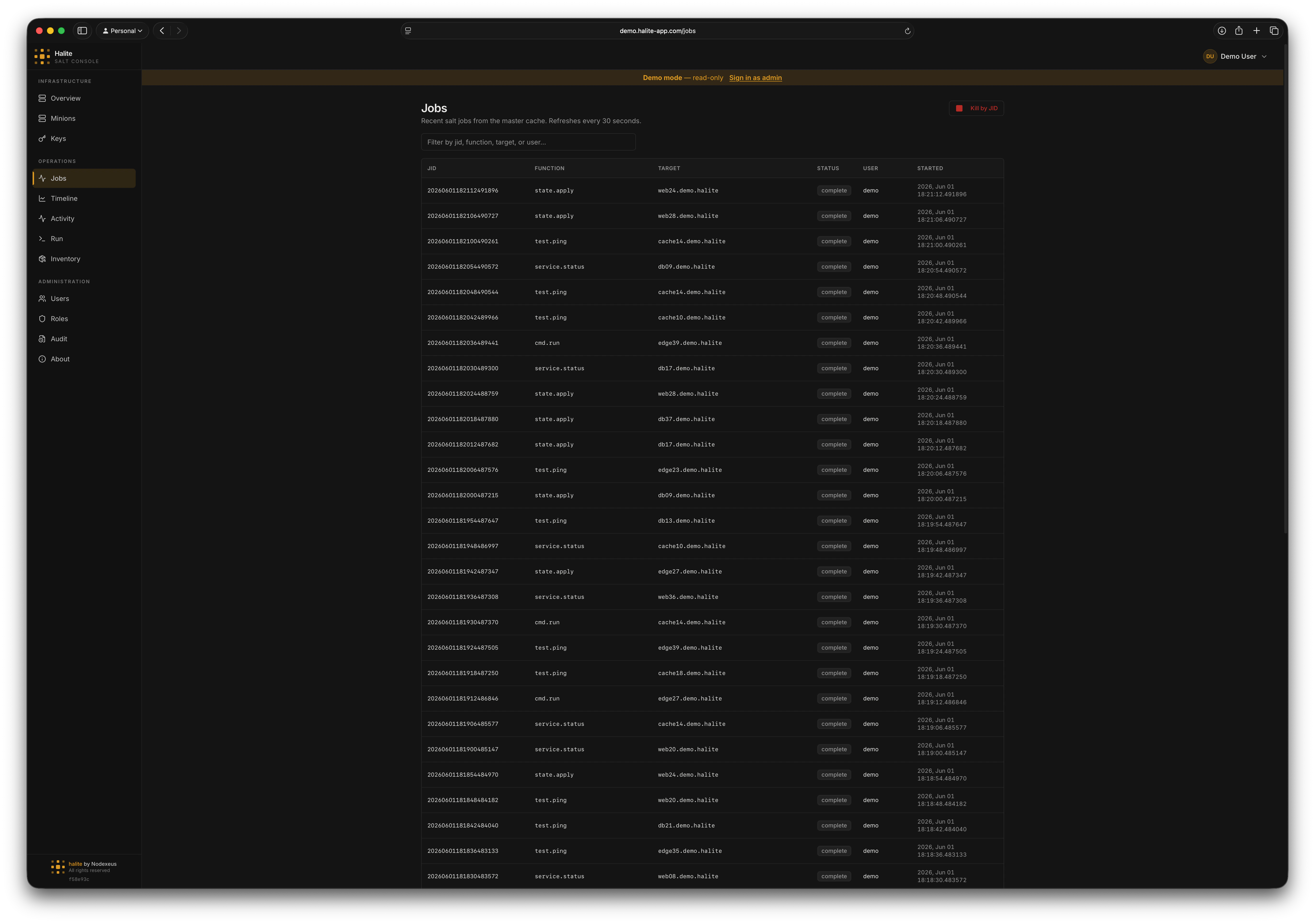
The default view shows the 50 most recent jobs ordered by start time descending, read from the local `jobs_index` table.
Each row shows:
* **JID** — the Salt job ID (encodes the UTC start time)
* **Function** — the module.function that was called (e.g. `test.ping`, `state.highstate`)
* **Target** — the targeting expression used
* **Target type** — the targeting method (glob, list, etc.)
* **User** — the Salt user who dispatched the job (from the Salt master)
* **Status** — `running` if the JID is in the active-JID cache; `complete` otherwise
### Live mode
Append `?live=true` to the URL (or toggle the **Live** switch in the UI) to bypass the database and fetch directly from the Salt master. This is useful immediately after dispatching a job before the poller has ticked. Live mode is capped at 500 jobs.
## Viewing job detail
Click **Jobs** in the left sidebar.
Clicking a row fetches the full job detail from the Salt master (`GET /api/jobs/{jid}`).
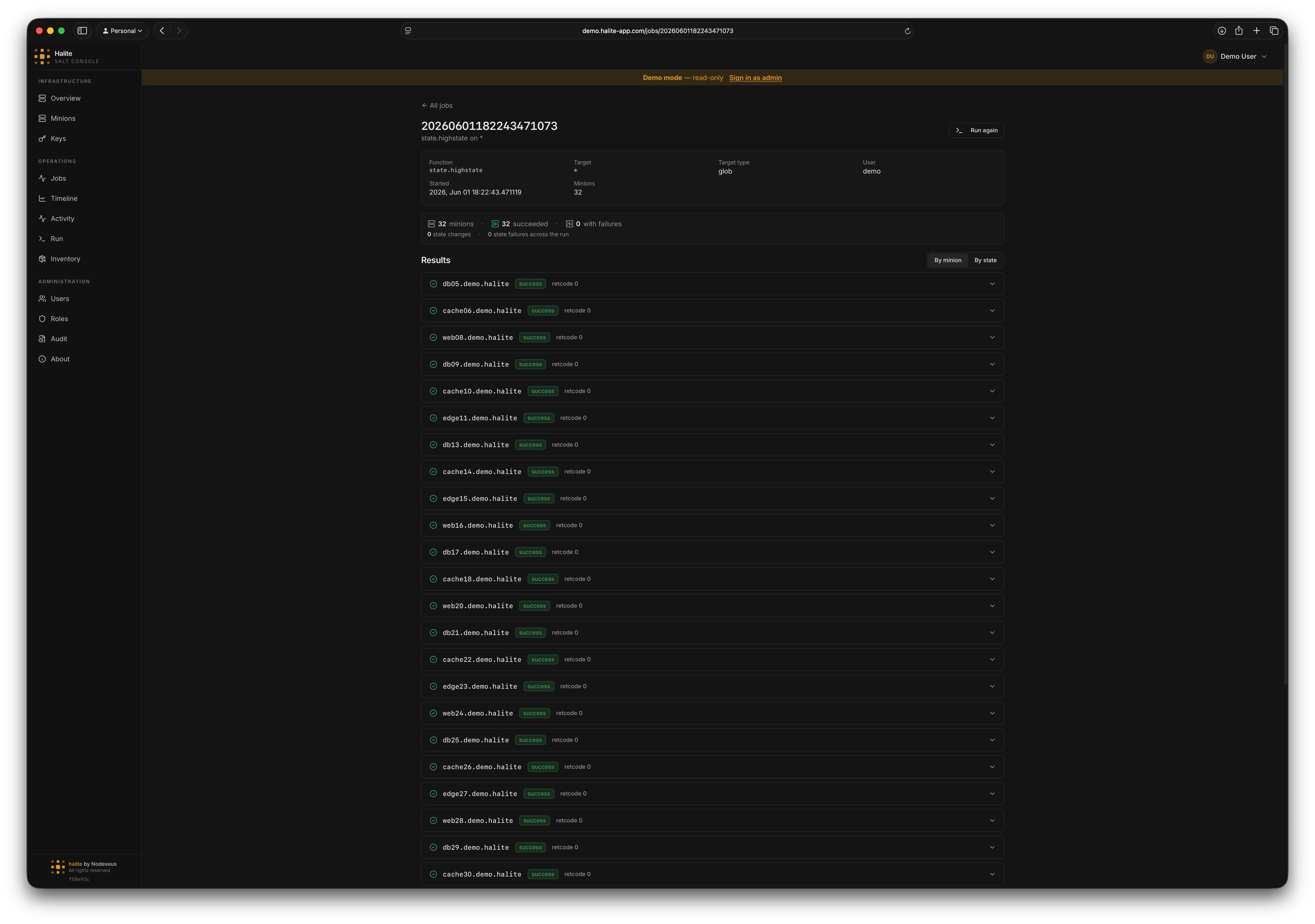
The detail view shows a table of every minion targeted, with columns for:
* **Return value** — the raw return from the minion
* **Success** — whether the minion reported a successful result
* **Return code** — the exit code (0 = success)
For `state.highstate` and other state jobs, the return value is parsed and displayed as a structured state result table with pass/fail counts per state.
## Browsing jobs
The default view shows the 50 most recent jobs ordered by start time descending, read from the local `jobs_index` table.
Each row shows:
* **JID** — the Salt job ID (encodes the UTC start time)
* **Function** — the module.function that was called (e.g. `test.ping`, `state.highstate`)
* **Target** — the targeting expression used
* **Target type** — the targeting method (glob, list, etc.)
* **User** — the Salt user who dispatched the job (from the Salt master)
* **Status** — `running` if the JID is in the active-JID cache; `complete` otherwise
### Live mode
Append `?live=true` to the URL (or toggle the **Live** switch in the UI) to bypass the database and fetch directly from the Salt master. This is useful immediately after dispatching a job before the poller has ticked. Live mode is capped at 500 jobs.
## Viewing job detail
Click **Jobs** in the left sidebar.
Clicking a row fetches the full job detail from the Salt master (`GET /api/jobs/{jid}`).
The detail view shows a table of every minion targeted, with columns for:
* **Return value** — the raw return from the minion
* **Success** — whether the minion reported a successful result
* **Return code** — the exit code (0 = success)
For `state.highstate` and other state jobs, the return value is parsed and displayed as a structured state result table with pass/fail counts per state.
 ## Highstate result parsing
When the function is a state job (function prefix `state.`), the per-minion return value is parsed from the raw Salt return dictionary into a structured list of state results. Each row shows the state ID, result (pass/fail), duration, and any changes or comments.
## Killing a running job
Killing a job sends a `KILL` signal to the job process on the Salt master. The job stops sending results but minions that have already received and begun executing the command may continue running locally. Use this as an emergency stop, not a rollback.
On the Jobs page, running jobs show a **Running** badge. You can also filter by status.
Open the job detail and click **Kill**. Halite sends `POST /api/jobs/{jid}/kill` (HTTP 202 Accepted).
The job status updates to `complete` on the next poll cycle. The kill action is recorded in the [audit log](/concepts/audit-log).
## Example: checking a recent highstate
Open the Jobs page and search for `state.highstate`. Click the most recent row. The detail panel shows a per-minion breakdown. Any minion with at least one failed state is highlighted in red, with the failing state ID and error message expanded.
## Permissions
| Action | Permission |
| ---------------------------------------- | ------------ |
| List jobs (`GET /api/jobs`) | `view:job:*` |
| Job activity (`GET /api/jobs/activity`) | `view:job:*` |
| Job timeline (`GET /api/jobs/timeline`) | `view:job:*` |
| Job detail (`GET /api/jobs/{jid}`) | `view:job:*` |
| Kill a job (`POST /api/jobs/{jid}/kill`) | `kill:job:*` |
The built-in **operator** role has both `view:job:*` and `kill:job:*`. The built-in **viewer** role has `view:job:*` only and cannot kill jobs.
## Highstate result parsing
When the function is a state job (function prefix `state.`), the per-minion return value is parsed from the raw Salt return dictionary into a structured list of state results. Each row shows the state ID, result (pass/fail), duration, and any changes or comments.
## Killing a running job
Killing a job sends a `KILL` signal to the job process on the Salt master. The job stops sending results but minions that have already received and begun executing the command may continue running locally. Use this as an emergency stop, not a rollback.
On the Jobs page, running jobs show a **Running** badge. You can also filter by status.
Open the job detail and click **Kill**. Halite sends `POST /api/jobs/{jid}/kill` (HTTP 202 Accepted).
The job status updates to `complete` on the next poll cycle. The kill action is recorded in the [audit log](/concepts/audit-log).
## Example: checking a recent highstate
Open the Jobs page and search for `state.highstate`. Click the most recent row. The detail panel shows a per-minion breakdown. Any minion with at least one failed state is highlighted in red, with the failing state ID and error message expanded.
## Permissions
| Action | Permission |
| ---------------------------------------- | ------------ |
| List jobs (`GET /api/jobs`) | `view:job:*` |
| Job activity (`GET /api/jobs/activity`) | `view:job:*` |
| Job timeline (`GET /api/jobs/timeline`) | `view:job:*` |
| Job detail (`GET /api/jobs/{jid}`) | `view:job:*` |
| Kill a job (`POST /api/jobs/{jid}/kill`) | `kill:job:*` |
The built-in **operator** role has both `view:job:*` and `kill:job:*`. The built-in **viewer** role has `view:job:*` only and cannot kill jobs.