> ## Documentation Index
> Fetch the complete documentation index at: https://www.halite-app.com/llms.txt
> Use this file to discover all available pages before exploring further.
# Activity
> A live feed of Salt event-bus activity — jobs, keys, and minions.
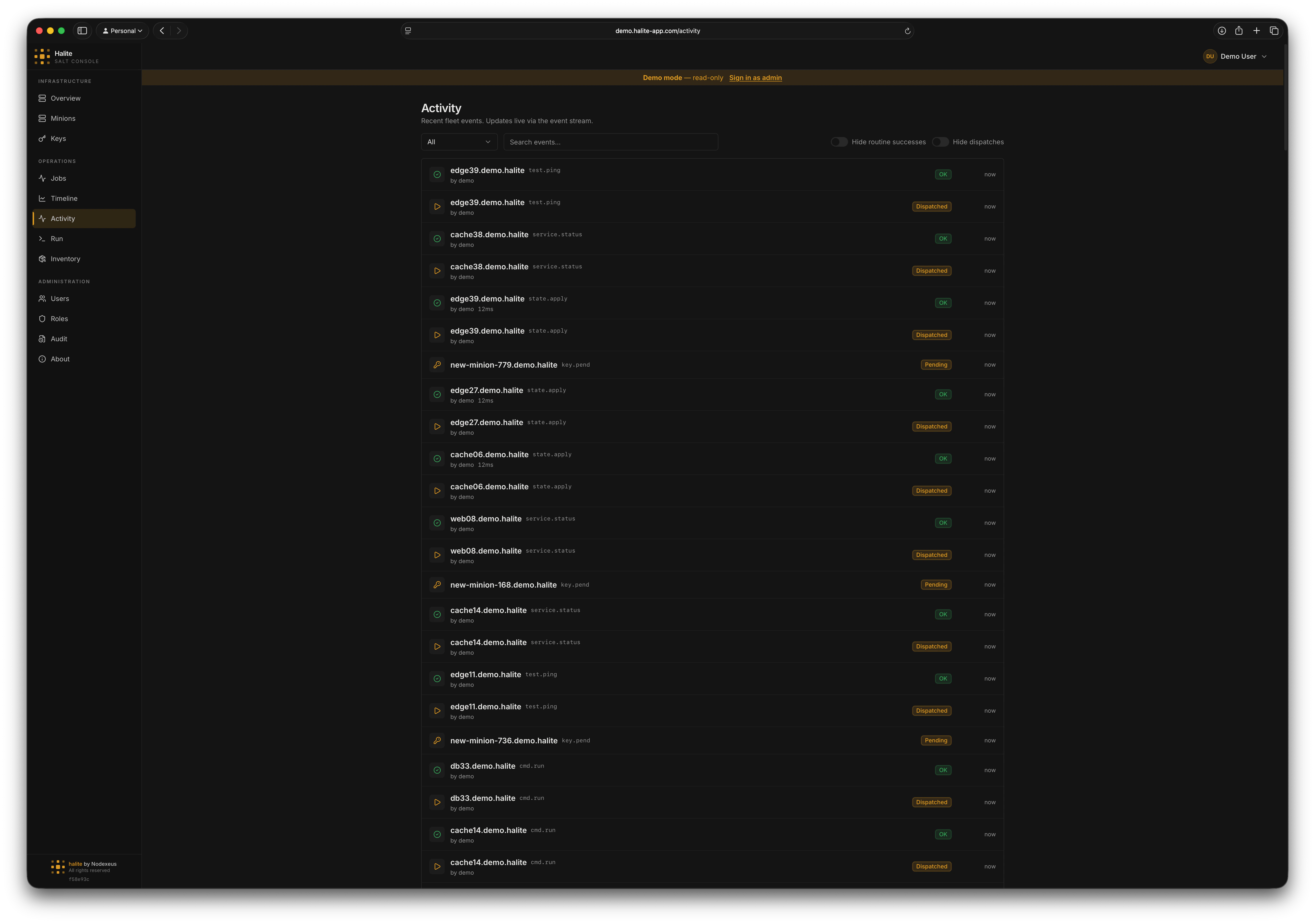
The Activity page is a chronological feed of what is happening across your fleet right now: jobs being dispatched and returning, minion keys being accepted or rejected, and minions coming online. Unlike most of Halite, which polls Salt on a timer, Activity is **streamed live** from the Salt event bus and updates in your browser the moment something happens.
Activity is only populated when the **event stream** is enabled in [Settings](/features/settings#event-stream). Until then, the page loads but shows no events. See [How Halite Works](/concepts/how-it-works#the-live-event-stream) for the architecture.
 ## Where the data comes from
When the event stream is enabled, Halite holds a long-lived connection to salt-api's `/events` endpoint and tails the Salt event bus. Each relevant event is normalized, stored in the `activity_events` table, and pushed to connected browsers over Server-Sent Events (SSE). The page therefore serves **history from the database** and **new events live from the stream** at the same time.
Because events are persisted, the feed survives page reloads and shows activity from before you opened the page — bounded by the configured retention window (default 30 days).
## Event categories
Every event falls into one of three categories, each tied to a permission:
| Category | Events | Permission |
| ---------- | ---------------------------------------------------- | --------------- |
| **Job** | `job.new` (dispatched), `job.ret` (returned) | `view:job:*` |
| **Key** | `key.accept`, `key.reject`, `key.delete`, `key.pend` | `view:key:*` |
| **Minion** | `minion.start` (came online) | `view:minion:*` |
You only see categories you have permission to view. A user with `view:job:*` but not `view:key:*` sees job events and never sees key events — both on the page and in the live stream.
### Job return states
Job returns (`job.ret`) are classified by outcome so you can scan the feed quickly:
* **Failed** — the job returned a non-zero retcode.
* **Changes** — the job succeeded and made state changes.
* **OK** — the job succeeded and made no changes (a "routine success").
Halite also surfaces the **initiator** (the Salt user or source that dispatched the job), the **target**, and the **duration** (wall-clock runtime, summed from the state results) on each row. When the event itself does not carry the initiator and target, Halite backfills them from the jobs index using the job ID.
## Filtering the feed
The Activity page gives you several controls to cut through the noise:
Limit the feed to a single category — **Job**, **Key**, or **Minion** — or show all.
Full-text match across the event summary, minion ID, function name, initiator, and target.
Hide **routine successes** — successful job returns that made no changes. Leaves failures and change-making runs visible. Useful for spotting drift and problems.
Hide **dispatch** events (`job.new`), so the feed shows only completions and outcomes rather than every command that was kicked off.
The feed defaults to showing **everything**, with these as opt-in hide toggles.
## Live updates everywhere
The same SSE stream that powers the Activity page also keeps the rest of the console fresh. When an event arrives, Halite invalidates the relevant cached queries:
* A job event refreshes the [Jobs](/features/jobs) data.
* A key event refreshes the [Keys](/features/keys) data.
* A minion event refreshes the [Minions](/features/minions) data.
So with the event stream enabled, those pages update in near real-time instead of waiting for their 30-second refresh.
## Permissions
The Activity page and its endpoints require **any one** of the three category permissions:
| Route | Required permission |
| --------------------------------- | ------------------------------------------------------------------------------------------- |
| `GET /api/activity` | Any of `view:job:*`, `view:key:*`, `view:minion:*` (results filtered to allowed categories) |
| `GET /api/activity/stream` | Same — 503 if the stream is disabled, 403 if you have no category permissions |
| `GET /api/activity/widget-config` | Any authenticated session (read-only display config) |
The **Activity** item appears in the sidebar whenever you hold at least one of the three category permissions.
## Related pages
* [Overview](/features/overview#recent-activity) — the recent-activity widget and live heartbeat on the dashboard
* [Settings](/features/settings#event-stream) — enable the event stream and tune retention
* [How Halite Works](/concepts/how-it-works#the-live-event-stream) — the streaming architecture
## Where the data comes from
When the event stream is enabled, Halite holds a long-lived connection to salt-api's `/events` endpoint and tails the Salt event bus. Each relevant event is normalized, stored in the `activity_events` table, and pushed to connected browsers over Server-Sent Events (SSE). The page therefore serves **history from the database** and **new events live from the stream** at the same time.
Because events are persisted, the feed survives page reloads and shows activity from before you opened the page — bounded by the configured retention window (default 30 days).
## Event categories
Every event falls into one of three categories, each tied to a permission:
| Category | Events | Permission |
| ---------- | ---------------------------------------------------- | --------------- |
| **Job** | `job.new` (dispatched), `job.ret` (returned) | `view:job:*` |
| **Key** | `key.accept`, `key.reject`, `key.delete`, `key.pend` | `view:key:*` |
| **Minion** | `minion.start` (came online) | `view:minion:*` |
You only see categories you have permission to view. A user with `view:job:*` but not `view:key:*` sees job events and never sees key events — both on the page and in the live stream.
### Job return states
Job returns (`job.ret`) are classified by outcome so you can scan the feed quickly:
* **Failed** — the job returned a non-zero retcode.
* **Changes** — the job succeeded and made state changes.
* **OK** — the job succeeded and made no changes (a "routine success").
Halite also surfaces the **initiator** (the Salt user or source that dispatched the job), the **target**, and the **duration** (wall-clock runtime, summed from the state results) on each row. When the event itself does not carry the initiator and target, Halite backfills them from the jobs index using the job ID.
## Filtering the feed
The Activity page gives you several controls to cut through the noise:
Limit the feed to a single category — **Job**, **Key**, or **Minion** — or show all.
Full-text match across the event summary, minion ID, function name, initiator, and target.
Hide **routine successes** — successful job returns that made no changes. Leaves failures and change-making runs visible. Useful for spotting drift and problems.
Hide **dispatch** events (`job.new`), so the feed shows only completions and outcomes rather than every command that was kicked off.
The feed defaults to showing **everything**, with these as opt-in hide toggles.
## Live updates everywhere
The same SSE stream that powers the Activity page also keeps the rest of the console fresh. When an event arrives, Halite invalidates the relevant cached queries:
* A job event refreshes the [Jobs](/features/jobs) data.
* A key event refreshes the [Keys](/features/keys) data.
* A minion event refreshes the [Minions](/features/minions) data.
So with the event stream enabled, those pages update in near real-time instead of waiting for their 30-second refresh.
## Permissions
The Activity page and its endpoints require **any one** of the three category permissions:
| Route | Required permission |
| --------------------------------- | ------------------------------------------------------------------------------------------- |
| `GET /api/activity` | Any of `view:job:*`, `view:key:*`, `view:minion:*` (results filtered to allowed categories) |
| `GET /api/activity/stream` | Same — 503 if the stream is disabled, 403 if you have no category permissions |
| `GET /api/activity/widget-config` | Any authenticated session (read-only display config) |
The **Activity** item appears in the sidebar whenever you hold at least one of the three category permissions.
## Related pages
* [Overview](/features/overview#recent-activity) — the recent-activity widget and live heartbeat on the dashboard
* [Settings](/features/settings#event-stream) — enable the event stream and tune retention
* [How Halite Works](/concepts/how-it-works#the-live-event-stream) — the streaming architecture